|
Re–specifying objects |
Scroll |
When performing many of commands it is required to specify an object that serves as the basis for construction. The specified object will be registered in the Parameter Panel. Its name will appear in the special field. If you need to specify multiple objects to perform the command, then the Parameter Panel displays a list to specify the objects as base ones.
|
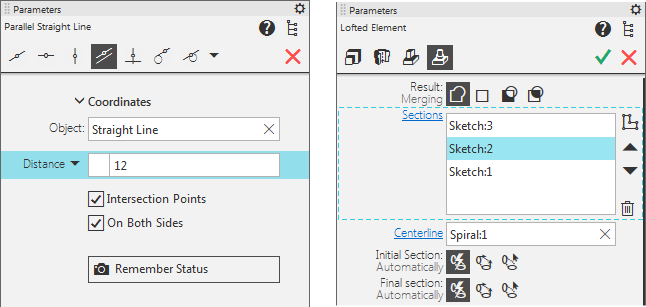
Registration of graphic and 3D base objects in the Parameter Panel
If you need to refuse the current set of object, you should delete their names from the Parameter Panel.
•To delete an object from field, click the  icon in the right side of the field.
•To delete an object from the list of objects, click the icon (it appears when you select the object or hover over it with the cursor). To remove several objects, select them and click the Delete  button.
After then you can specify the base object(s) from the start.
Some commands (mainly in graphic documents) assume construction of a group of objects which are based on the same object. For example, if you specify a line segment, you can construct multiple segments parallel to it. In this case refusing the current selection allows to complete construction of one group of objects and proceed to another one (i.e. based on another object) without invoking the command again.
