|
Propagating parameters between commands |
Scroll |
The commands for plotting objects of the same type are grouped together. For example, a graphic document has command groups for plotting line segments, circles, dimensions of various views etc., and a model has command groups for adding and removing material of solids, constructing holes, overlaying matings, creating points, straight lines etc.
During performing one of the commands of a group you can proceed to performing another one without terminating the current command. To do that, use the buttons located in the Parameter Toolbar header.
|
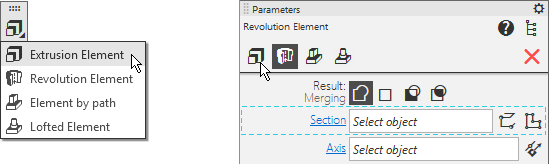
Buttons for invoking commands of the group on the toolbar panel and in the Parameter Toolbar header
In cases when different commands of a group can use the same parameter, its value is retained after changing the command. For example:
•a sketch selected to perform an extrusion operation remains selected after switching from extrusion to rotation,
•a radius set to construct a circle by center and radius remains in the Radius field when proceeding to construction of a tangent circle,
•part faces specified for at distance mating remain specified after proceeding to at angle mating.
Note the following specifics of propagating parameters between commands:
•The propagation is done if another command of the group is selected before creation of the object. After the object is created, the parameter values become default ones.
•The parameter is propagated among all commands of the group which can use it, provided that they are invoked sequentially. If you choose such a command from the group which does not have that parameters, then its value is discarded. For example: to construct an arc by center and radius you set the radius, than you invoked the command for tangent arc construction – the radius is propagated to it. But if after entering the radius you invoke the Arc by Three Points command, and only then the Tangent Arc command, then the radius value will be lost, as construction of an arc by three points does not suppose specifying the radius.
•In some cases, the availability of the Create Object  button in the command depends on whether parameters were passed to this command from another command of the group. For example: you invoked the command for plotting an arbitrary construction straight line and specified its first point, then you invoked the Vertical Line command. The straight line phantom becomes vertical and goes through the specified point, the Parameter Panel displays the Create Object button. The user can either change the point or confirm construction of the straight line in the current position. But if you invoke the Vertical Line command before specifying the point, there will be no Create Object button in the toolbar – the straight line is created automatically after the point is specified.
