|
Displaying parameters of objects next to the cursor |
Scroll |
When creating and editing geometric objects their parameters may be displayed not only in the Parameter Panel fields but next to the cursor as well (see Figure). This facilitates checking the correctness of constructions.
|
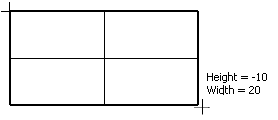
Displaying the object parameters next to the cursor
Control of parameter display is performed using the option Display command parameters in the parameter settings dialog (see section Cursor).
