|
Parameters of break line |
Scroll |
If you select a wavy or jogged break line, controls for their settings appear on the Parameter Toolbar. The description of the controls is given in the table.
Controls for wavy line and line with bends
The element |
Description |
||
Number of Half-waves |
The field is present when setting up the wavy line and is used to enter the number of half-waves. |
||
Number of bends |
The field is present when setting up the line with bends and is used to enter the number of bends. |
||
Amplitude, max Amplitude, % |
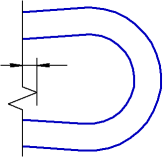
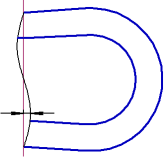
Amplitude is deviation of a line with bends or a wavy line from the middle line, see the picture. |
||
|
|
||
•In the Amplitude, max you set the maximum allowed amplitude in mm. This field is present on the Parameter Toolbar when configuring both lines with bends and wavy lines. The value you enter in this field determines: •The Amplitude,% field is present in the Parameters panel when configuring wavy line. It sets the value of amplitude for a wavy line as a percentage of the break length.
|
|||
If the wavy line amplitude calculated as percentage from the length of break exceeds the maximum amplitude value, then the specified maximum value, instead of the calculated one, will be used to draw the line. |
|||
|
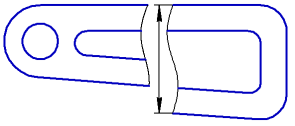
It is more convenient to configure the parameters of the break lines in the Editmode, since in it the break boundaries are displayed not as straight lines, but "realistically", i.e., the same as they will be after the command is completed. |

