|
Overview |
Scroll |
You can split faces of a surface or a solid into several new faces. The resulting model acquires additional edges which are borders between the newly formed faces, see the pictures.
|
|
a) |
b) |
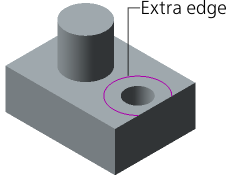
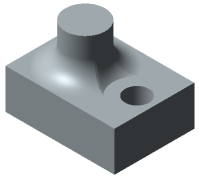
Usage of an edge created by splitting a face
a) initial state of the part, b) result of plotting a fillet with preserved flange
You can use an arbitrary set of solid faces and/or surfaces as the surface being split.
When you select an object in the Design tree, the surface being split is generated using all the faces of the selected object. If solids are selected in the Tree, then the surface to be split will be represented by the solids.
You can split a surface as follows:
•by curves lying on the surface,
•along the lines of intersection with other surfaces, solids, and planes,
•by contours projected onto the surface.
See Also
