|
Model lighting schemes |
Scroll |
You can change the appearance of the model by adjusting direction of light. The optimal lighting for a particular model is determined by its shape. When working in KOMPAS-3D, several lighting schemes of the model are available. To set the required schema, select its name in the View – Lighting Schema menu. Model lighting schemes are listed in the Table.
Model lighting schemes
Schema |
Description |
How the model looks |
|
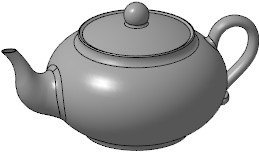
Lighting by one source |
The model is illuminated by one light source. Lighting direction is diagonally from left to right. |
|
|
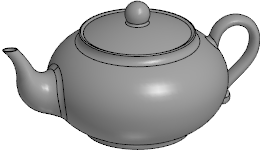
Additional bottom lighting |
The model is illuminated by two light sources. Lighting direction: diagonally from right to left and from bottom. Unlike in the Lighting by one source schema, the model is illuminated more smoothly and its relief is brighter. This is the default schema for a part. |
|
|
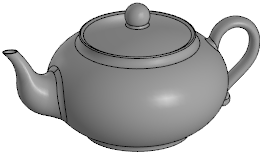
Lighting by By three sources |
The model is illuminated by three light sources from three sides. The schema provides smooth lighting of the model from all sides. This is the default schema for an assembly. |
|
|
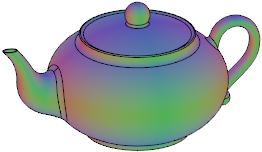
Color lighting along the CS axes |
The model is illuminated by three sources, their light is directed along the X, Y, Z axes. The color of the light source corresponds to the axis color. The schema allows you to assess the shape and slope of faces. It is convenient when working with models of a complex shape. |
|