|
General information system setup |
Scroll |
The system parameters setup for KOMPAS-3D is done in the System tab of the dialog, which is invoked by the Setup — Options... command.  (see Figure).
In the left-hand part of the tab, there is a list of setup objects represented in the form of a "tree". They are grouped into sections according to their purpose. Once a certain item has been selected in the left-hand part, controls to do the setup appear in the right-hand part of the tab.
|
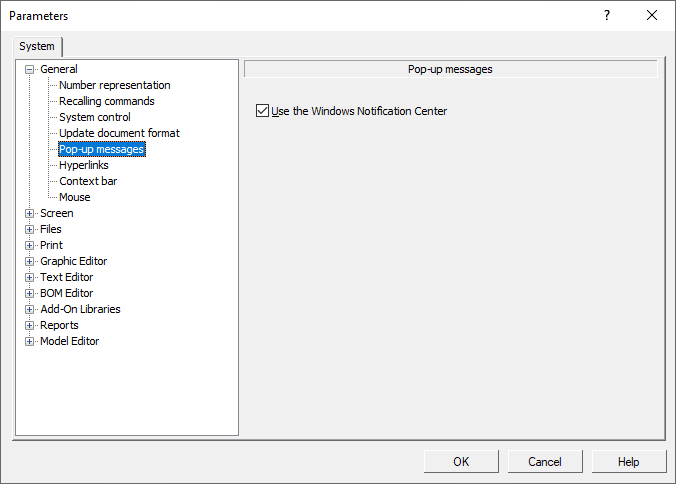
Dialog for setting up pop-up messages
When the dialog is closed by pressing the OK button, information about system settings is written to the *.cfg file (see section… Configuration Files) and is used in the next work session.
Note the following conventions and simplifications used in this section:
•Hereinafter, the "dialog" will not imply a whole setup dialog but only a set of controls to set up a certain object.
•Reference to this set of controls will be described as follows: Options — Parameters... — System — Section Name (group of settings objects) — Subsection Name (subgroup of settings objects). For example, if the text says: “Setting up the parameters of displaying pop-up messages is performed in the Pop-up messagesdialog. The dialog appears on the screen after fetching the Settings — Parameters... — System — General — Pop-up messages command, then that means to access the setup of pop-up messages it is necessary to perform the following sequence of actions.
1.In the Main menu, select the Settings item.
2.In the appeared list of commands in the Settings menu, select the Parameters... command.
3.In the dialog that appears, activate the System tab.
4.In the list of setup objects, expand the General section.
5.Select the Pop-up messages subsection.
Controls under the general heading Pop-up Messages used for setting parameters of messages will appear in the right-hand part of the tab.
