|
Use of Fitting |
Scroll |
Fitting is used when it is necessary to change the geometry of a base object of a thread according to the selected rated thread diameter.For cylindrical surfaces, the diameter is "fitted" according to the thread parameters, while for conical surfaces, both the object diameter in the base plane and the cone angle are "fitted". An example of fitting when building a thread in a simple hole is shown in the figure.
|
|
a) |
b) |
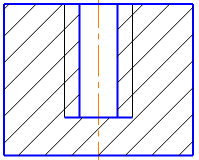
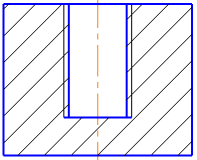
Example of building a thread in a simple hole
a) without fitting, b) with fitting
|
Fitting modifies only the face which was specified as the base face for a thread. Therefore, if you want to create a thread with fitting on several coaxial surfaces (for example, a hole in two parts), the operation should be run for each surface separately. |

To enable and disable fitting, use the Fitting option on the Parameter Panel during creation or editing of the cosmetic thread. If during creation, the initial and/or final border of a thread is displaced, you can use options of additional fitting — Offset 1 and/or Offset 2.
When fitting a hole with a countersink (either a chamfer or by fillet), the countersink depth changes. Enabling the option of additional fitting Offset 1 allows to displace the initial border of the section on which the thread is formed to the initial position and to save the initial depth of countersink, see the figure.
|
|
|
a) |
b) |
c) |

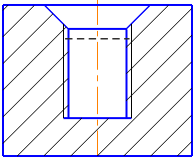
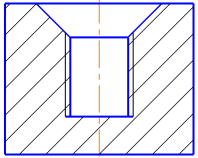
An example of building a thread in a hole with a countersink
a) without fitting, b) with fitting, Displacement 1 option is disabled (the depth of the countersink before fitting is indicated by a dashed line), c) with fitting, Displacement 1 option is enabled
When fitting holes with a non-flat bottom, the length of the surface section on which the thread was created changes. Enabling the additional fitting option Offset 2 allows you to displace the final border of a thread while maintaining its initial length, see the figure.
|
|
|
a) |
b) |
c) |
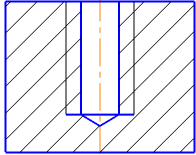
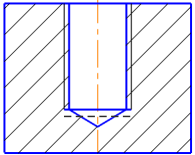
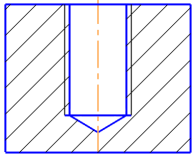
Example of building a thread in a hole with non-flat bottom
a) without fitting, b) with fitting, the Displacement 2 option is disabled (the border of the thread before fitting is indicated by a dashed line), c) with fitting, the Displacement 2 option is enabled
|
For a rod with external thread having a chamfer or fillet at the initial/final thread border, additional fitting is performed similar to that for a hole. |
It is possible to enable/disable "fitting" without entering the process of editing a thread — using the Fitting command in the context menu of the thread in the Model Tree.
|
The Fitting command is unavailable in the context menu of the thread in the Model Tree if: •the diameter of the base object of the thread matches the nominal diameter of the thread, •the model document was created in KOMPAS-3D version 14 SP1 or earlier. |
