|
Parameterization of conic curve coefficient |
Scroll |
A feature of the conical curve is the ability to control its coefficient through a variable.
The variable corresponding to the coefficient of the conic curve (v1 in the figure below) is automatically created in the document if the construction of the conic curve is performed in parametric mode. The constraint Fixed Coefficient is applied to the curve itself. A variable and a constraint also arise if the process of editing a curve was initiated (by double-clicking the mouse) in parametric mode and at least one of its parameters was changed.
Further work proceeds as usual: the variable can set the value by any available means, and when editing, the curve is adjusted to maintain the specified coefficient value.
|
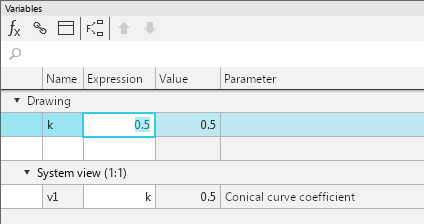
Variable controlling the conic curve coefficient in the drawing
When selecting a parameterized conic curve, the fields Coefficient and Height in the Parameter Panel are not available for input.
|
While constructing/editing a conic curve, you can specify both the coefficient and the height of the curve. A variable arising in the document in any case corresponds to the coefficient. |

|
After truncating the parametrized conical curve, the variable that controls its coefficient is retained, therefore the shape of the curve changes as a result of the truncation. When trimming a non-parametric curve, this does not happen: the segment remaining after trimming exactly corresponds in shape to the original curve but has a different coefficient. |
If it is required to remove a variable defining the coefficient of a conic curve from the document, you should delete the constraint from this curve Fixed coefficient.
See Also
