|
Modes of building a node in section |
Scroll |
In the course of creation of designation of a node in section, the following operation modes are possible: Adding hatches and Edit Points.
After invoking the command to create designation of a node in section, the Adding hatches mode is active, and when editing a formerly created designation – the Edit points mode.
Creation of designation is performed in the Adding hatches mode.
The Edit points mode is used to change the configuration of designation.
To switch between the work modes in the process of creation of designation, the Adding hatches/Edit points toggle switch is used. It becomes available after indication of position of the landing.
You can edit a designation configuration by changing the position of its defining points with the mouse in the graphic area. Defining points of a node in section have various shapes, depending on the actions performed by them.
•The point  allows changing the position of the starting point of the landing.
•The point  at the end of the landing allows to rotate the landing.
•The point in the center of a stroke allows to move the stroke.
|
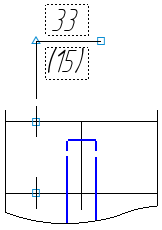
Defining points of sectional node point designation
To select a defining point, move the cursor closer to it. The shape of the cursor will change – it will turn into a quadrilateral arrow. Press <Enter> or left-click it – the point will be selected.
To change the position of points, use the following methods.
•Dragging a point with the mouse.
Click the point with the left mouse button and, without releasing it, move the cursor to the desired position. Then release the mouse button.
•Moving a point using the keyboard.
Move the cursor using the arrow keys. Then press <Enter> to undo selection.
•Setting the coordinates of a characteristic point.
Enter new coordinates of the selected point into the Current point field on the Parameters panel.
To delete a stroke, select the point in the middle of the stroke and press the <Delete> key. The hatch will disappear, and designation will be rebuilt according to the position of the remaining defining points.
