|
Attribute type dialog |
Scroll |
Allows you to create new or edit existing attribute types, as well as perform various operations with external libraries of attribute types.
It allows you to enter or edit attributes for the selected object (multiple selected objects) or document.

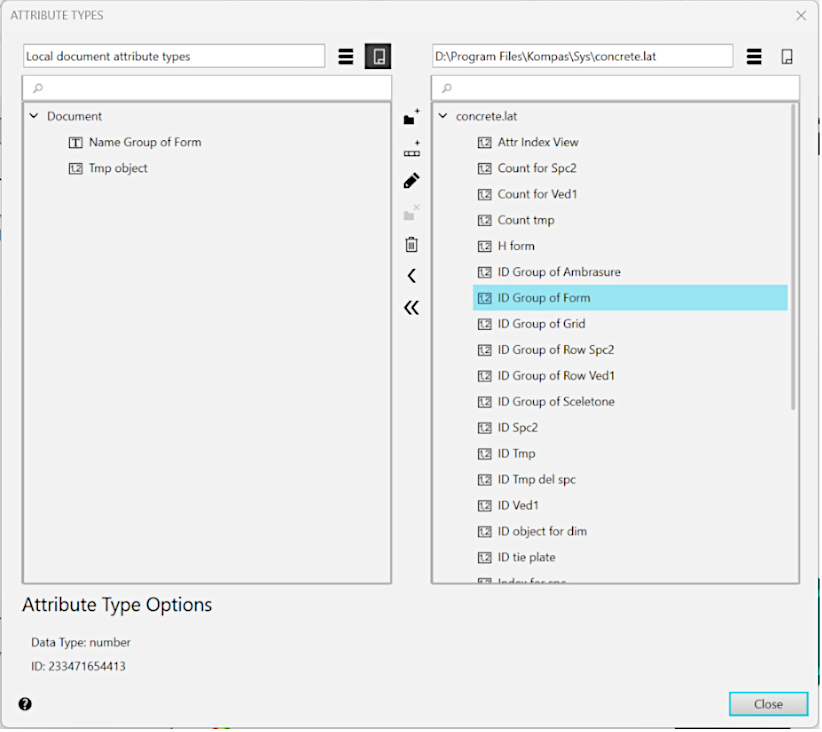
The dialog contains two windows for viewing attribute type lists. Only one viewing window can be active at a time. To activate a window, click it. When the attribute type is selected from the list, the attribute type options are displayed in the lower part of the dialog: Data Type and Identifier.
Description of Controls
The element |
Description |
|
|
Show Library |
To display in the active window a list of attribute types stored in the library *.lat, click this button. |
|
Show Document |
To display in the active window a list of attribute types stored in the active document, click this button. |
|
Create Section |
To create a new section (subsection) to place attribute types, click this button. A dialog appears in which you need to enter the name of the new section. To merge several sections into a common section, select them in the list and press the Merge into Section button (the button will be displayed instead of the Create Section button). |
|
Destroy the partition |
To delete a section from the list, click this button. The button is available if the section is selected in the list. |
|
Create an attribute type |
To create a new attribute type in the current section, click this button. On the screen, there will appear the dialog for creation of an attribute type. |
|
Preview |
To view the selected attribute type, which is not available for editing, click this button. |
|
Edit |
To edit the selected attribute type, click this button. |
|
Delete |
To remove an attribute section or type from a document or library, select it in the list and click this button. |
|
Copy |
To copy the selected attribute type, click the required button. The attribute type will be copied to the adjacent window (to the section that is active). |
|
Move |
To transfer the selected attribute type, click the required button. The attribute type will be removed from the active window and placed in the next (in the section that is active there). |


To complete the dialog for working with attribute types, click the Close button.
