|
List settings dialog |
Scroll |
This dialog appears on the screen:
•when you type and edit text, place the cursor in the paragraph of the list, and then:
•call the Format — Numbering parameters  command,
•or press the  button next to the name of the element group List on the Parameters toolbar,
•when setting the parameters of the text on the drawing, the text of the technical requirements, etc. – click in the setup dialog List parameters... button.

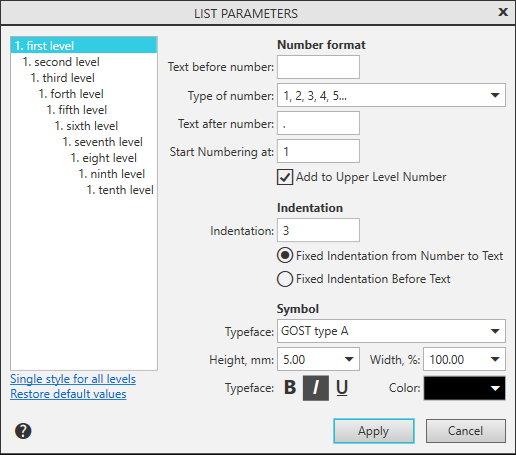
The dialog allows you to set the parameters for numbering paragraphs of the text. The setting made is the same for all text.
Description of Controls
Name |
Description |
|
Level list |
You can set various parameters for lists of various levels. Select the required level from the list and set the respective parameters in the dialog sections. |
|
Number format |
||
Text before number |
Set a text to be added before a number. |
|
Type of number |
From the list, select the required type of numbering (Arabic numbers, Roman numbers, letters, etc.). |
|
Text after number |
Set a text to be added after a number. |
|
Start from the position of |
Set a position to start numbering. |
|
Add to Upper Level Number |
Enable this option if it is required that the current number be added an upper level number (for example, as in 2.1). |
|
Indentation |
The indent value is set in millimeters. |
|
Indentation |
Sets the indentation in numbering. The method of indenting is determined by the following two controls. |
|
Fixed Indentation from Number to Text |
Sets an indent identical for all numbered paragraphs from the last character being part of the number to the start of indentation text. |
|
Fixed Indentation Before Text |
Sets an indent identical for all numbered paragraphs from the left–hand border to the start of indentation text. |
|
Symbol |
||
Typeface |
Select from the list of fonts the desired font. |
|
Height, mm |
Sets the height of the character. |
|
Width,% |
Sets the value of the narrowing factor for characters. |
|
Typeface |
||
|
Bold |
Sets character typeface thickness. |
|
Italic |
Sets italic (oblique) character typeface. |
|
Underlined |
Sets the underline text. |
Color |
The field displays the current color of text symbols. To select the color, a dropdown list of the field is used. |
|
Single style for all levels |
Click on this link to apply the settings for lists of all levels. |
|
Restore default values |
Click this link to reset the numbering parameters for all levels to the default values. |


After completing the numbering settings, click the Apply button. To exit the dialog without saving changes made, press the Cancel button.
