|
Text format settings dialog |
Scroll |
This dialog appears on the screen after calling the Format - Caption format... command

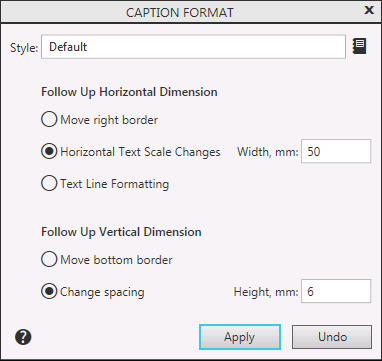
Here you can change the text formatting options.
Description of Controls
Name |
Description |
|
Follow Up Horizontal Dimension |
In this group the method of formatting text in a cell in width is set. |
|
Move right border |
Enable this option if the text should be formatted as you enter it by moving the right border. |
|
Change Horizontal Text Scale |
Enable this option if you need to format the text as you type it by changing the width of characters. Thus, the text will fit the specified sizes. |
|
Text Line Formatting |
Enable this option if text formatting as you type it should be done by automatically moving the word to a new line when it reaches the border. |
|
Width, mm |
A field to enter the text width. Available if the option is enabled changing horizontal text scale or text line formatting. |
|
Follow Up Vertical Dimension |
In this group the method of formatting text in a cell by height is set. |
|
Move bottom border |
Enable this option if you want to move the lower border as you type. |
|
Change spacing |
Enable this option if you need to change the line pitch as you type. Thus, the text will fit the specified sizes. |
|
Height, mm |
A field to enter the text height. Available if the Change Line Spacing option is enabled. |
After setting the parameters, press the Apply button. To exit the dialog without saving changes made, press the Cancel button.
