|
Fix table size dialog |
Scroll |
The dialog allows you to set limits on rebuilding the table, that is, to make its structure and size rigid.

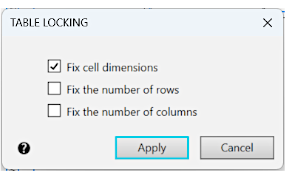
Description of Controls
Name |
Description |
|
Fix cell dimensions |
Enable this option so that the cell sizes of the table cannot be changed. |
|
Fix the number of rows |
Enable this option to fix the current number of rows in the table. |
|
Fix the number of columns |
Enable this option to fix the current number of columns in the table. |
After the table attributes have been configured, click Apply. To exit the dialog without saving changes made, press the Cancel button.
|
You can prohibit change of the structure of table using the group of options Fix Table Size in the Table sector on the Parameter Panel. |

