|
Punching |
Scroll |
When you select stamping with solid you can select the faces of the solid used as a cutting tool in the place of which holes will be formed in the die form.
The figure shows an example of a die form built with punching and without punching.
|
|
a) |
b) |
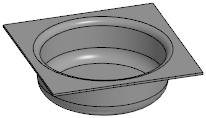
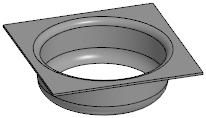
Stamping with solid: a) without punching, b) with punching
To generate holes instead of faces in the die form, do the following operations.
1.Set the switch Punching to position I (enabled).
2.Specify faces of the solid used as a cutting tool. Names of the selected faces will be displayed in the field Tool edges.
Holes will appear instead of faces on the phantom of the die form.
3.Select a method of forming hole edges by clicking the required button in the Cutting edges group:
 Perpendicular to sheet surface — the edge surface is perpendicular to the stamping face surfaces, adjacent to the trimming face (figure a),
 Along the cutting surface — the edge is trimmed as an extension of the punching edge (Figure b). Such an edge, in general, is not perpendicular to the surface of the stamping faces adjacent to the punching edge.
|
|
a) |
b) |
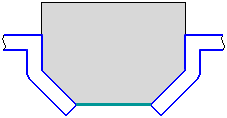
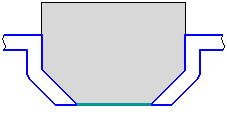
Drawing schemes for punching edges (the drawing schemes depict a section of the die form by a plane,
(perpendicular to the base face; the projection of the punching face is marked with a thick segment):
a) perpendicular to the sheet surface, b) along the surface of the punching .
