|
Printer Device Driver Change dialog |
Scroll |
This dialog appears on screen when the user, while working in KOMPAS-3D, switches to another Windows application and deletes the driver of the current printer (default printer) or changes its name, then returns to KOMPAS-3D.

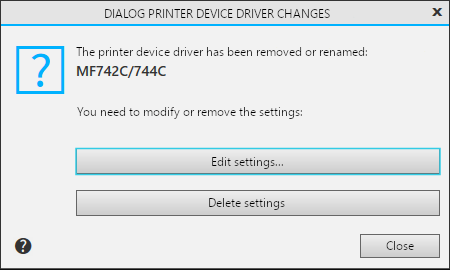
Description of Controls
Name |
Description |
|
Change settings... |
To select a different output device driver, click this button. In the standard Print settings dialog box that appears, select the device in the list of available devices. |
|
Delete settings |
Press this button to remove old print settings KOMPAS-3D. If you worked in preview mode, it will be automatically closed and returned to the graphical editor. Subsequently, when switching to the preview mode, the printer driver used as the default printer will be used. |
|
Close |
To close the dialog without saving changes, press the button. |
