|
Dialog for setting up writing to IFC format |
Scroll |
This dialog appears on the screen after clicking the Parameters in the file selection dialog box Saving the model in IFC format.
The dialog allows you to set up the parameters of writing a model to IFC format.

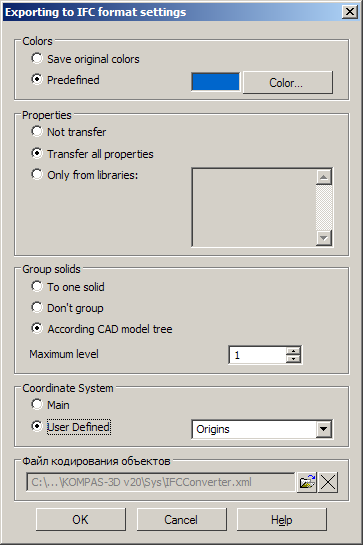
Description of Controls
The element |
Description |
|
Geometric representations |
This group of options is used to manage the import of model objects. If the options are enabled, the following KOMPAS-3D objects are imported to the IFC file: •Solid is a polygonal object from the initial model; •Size — the bounding parallelepiped of the source model if the Solids option is disabled; •ACenter of Gravity — a geometric point at the center of gravity of the original body; •Axes — all axes constructed in the source model; •Connecting points – all the connecting points of the source model. The structure of the resulting objects in the IFC file depends on the settings of the element Body grouping. |
|
Colors |
A group of options that is used to customize writing of colors of transferred objects. Enable the option Transfer source color so that bodies have the colors of the faces of the source bodies, and the dimensions have the colors of the source parts or bodies. If the objects should have the color specified during setup, enable the Predefined option and select the color. |
|
Properties |
A group of options that is used to limit the list of properties of KOMPAS-3D components/solids transferred to the IFC file. Please enable this option: •Not transfer, so that no properties are transferred. •Transfer all to transfer all the properties associated with the object properties in IFC format.
•Only from libraries, to transfer properties from libraries (*.lpt). Library files must be placed in the \\SYS subfolder of the main system folder. In the field to the right of the option, enter the property library names without specifying the path, for example: |
|
Solids grouping |
A group of options that is used to select the structure of objects in the IFC file. Please enable this option: •Combine into one body — a single object of the IfcBuildingElementProxy class will be obtained. •Do not group — several objects of the IfcBuildingElementProxy class will be obtained according to the number of solids in the assembly and subassemblies. •Group by CAD structure — the structure of objects that corresponds to the structure of the KOMPAS-3D tree will be obtained: |
|
Coordinate System |
This group of options manages recalculation of coordinates of the object geometry in the IFC file. Please enable this option: •Main — coordinates of IFC objects will be presented in the main coordinate system of the original KOMPAS document. •User Defined — the coordinates of the IFC objects will be represented in the selected UCS of the original KOMPAS document. |
|
Object encoding file |
The field contains the name of the xml-file which is used to encode objects when transferring to IFC format. •The Open button to the right of the field allows you to attach a file (*.xml) that was created previously. This means that the method encoding using an xml-file is selected. •Delete button allows disconnecting the file, deleting it from the field. An empty field means that the method encoding without an XML file is selected. A sample file is connected by default. |
On completion of the set-up, press the OKbutton. To cancel settings, click Cancel.
