|
Objects for creating LCS |
Scroll |
When you plot a local coordinate system of the object It requires specifying the object whose parameters allow you to uniquely determine the position and orientation of the LCS. The available objects for indication and the parameters defined by them are given in the table.
Object |
Position of starting LCS |
LCS Axes Direction |
|
Sketch |
Start of Sketch Coordinate System |
X: coincides with the X-axis of the sketch coordinate system, Y: coincides with the Y-axis of the sketch coordinate system, Z: auto determination |
|
Intermediate vertex of the broken line |
Broken line vertex |
X: parallel to the previous segment of the broken line, Y: parallel to the projection of the next segment of the broken line on a plane perpendicular to the X axis, Z: auto determination |
|
Point, created byOn Curve (except points on a linear curve) |
Point |
X: parallel to the tangent of the curve at the point, Y: parallel to the principal normal to the curve at the point, Z: auto determination |
|
Point, created by On surface or Projection |
Point |
X: parallel to the tangent by direction U, Y: parallel to the tangent by direction V, Z: auto determination |
|
Circular or elliptical arc (curve, contour in sketch, or edge) |
Arc center |
X: directed to the starting point of the arc, Y: auto determination, Z: perpendicular to the arc plane |
|
Coordinate System |
The beginning of CS |
X: coincides with the X-axis of the coordinate system, Y: coincides with the Y-axis of the coordinate system, Z: coincides with the Z-axis of the coordinate system |
|
Solid (except for solids that do not have inertia axes, for example, a ball) |
Center of Gravity |
X: coincides with the axis of inertia Ox, Y: coincides with the axis of inertia Oy, Z: coincides with the axis of inertia Oz If the solid has one inertia axis (for example, a cylinder), then the Z axis of the LCS is congruent with it. |
|
Flat face |
Center of mass of the face |
X: coincides with the X-axis of the face coordinate system, Y: coincides with the Y-axis of the face coordinate system, Z: auto determination |
If a flat face is indicated for the creation of an LCS, then on the Parameter Panel there is an option External Contour Only. It controls the position of the center of mass of the flat face, which determines the position of the LCS. If this option is enabled, then only the outer contour of the face is taken into account when calculating the center of mass of the face. With the option disabled, the center of mass of the face is calculated taking into account the internal contours of the face.
The figure shows options for the location of the center of mass of the flat face; the center of mass is marked by a circle.
|
|
a) |
b) |
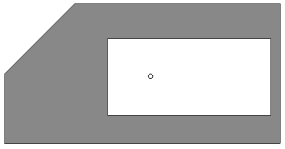
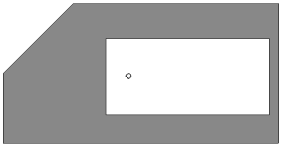
Variants of the placement of the center of mass of the flat face:
a) when the option Only outer contouris on,
b) when the option Only outer contour is off.
