|
Overview |
Scroll |
<PRODUCT_NAME%> allows you to create a sheet solid based on an existing model.
The object for transformation can be a solid or surface model in KOMPAS-3D, including a part without construction history or an imported part. Drawing a sheet solid from an assembly or a stock part is impossible.
|
If the source model contains multiple solids or solids made of separate parts, then only one whole solid or solid part can be used in the transformation operation. |

To perform the transformation, define a flat face of the original model, select edges or fillets between flat faces, in place of which there will be bends in the sheet solid.
The planar faces of the model form flat areas of the sheet solid, the edges between the planar faces form bends with a user-defined radius, while the fillets form bends of the corresponding radii. In place of holes, bosses, etc. holes are formed in the sheet solid. Non-flat faces are ignored.
|
|
a) |
b) |
|
|
c) |
d) |
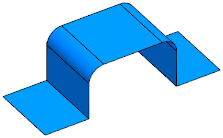
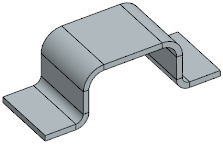
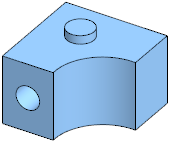
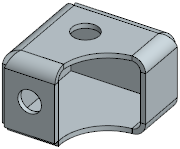
Examples of conversion of a surface and solid to sheet solid:
a), c) source items, b), d) respective results of plotting
The source item can be hidden or can remain in the model. The sheet solid maintains an associative link with it.
See Also
