|
Specifying object with a cutting segment |
Scroll |
When performing the Trim a curve, Extend to Next Object and Drag to Border commands you can specify objects one by one or in a group. To specify a group of objects you use a cutting segment., i.e. a segment intersecting the objects you need to specify.
To copy objects using the cutting segments, do the following.
1.Set the cursor at the first point of the cutting segment.
2.Click the left mouse button and move the cursor to the second point of the segment while holding the button pressed. While you move the cursor, the cutting segment is being generated. It is shown as a dotted line. The objects intersected by the segment are highlighted.
3.Release the button when the segment intersects all the desired objects.
The figure shows an example of specifying a group of objects to align by the specified border.
|
|
|
a) |
b) |
c) |

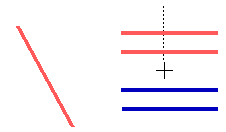

Selecting a group of objects with a cutting segment to align by the specified border: a) original image, b) selecting objects using a cutting segment, c) alignment result
