|
Louver Height and Width |
Scroll |
The Figure shows geometric parameters of the louver.
|
|
|
a) |
b) |
c) |
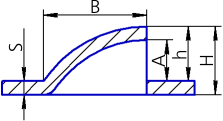
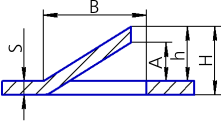
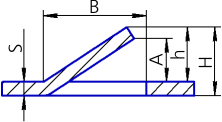
Louver geometric parameters
a) elongated; b) truncated, with a flange in the truncation direction;
c) truncated, with a flange by normal to thickness
The louver height can be defined in various ways. The required method is selected using the Setting of height group of buttons.
The louver height is set in the Height field. The admissible height values depend on the thickness of sheet material (S) and width of the louver (B). The dependence of various methods for setting height is given in the Table
The admissible values of louver height
Method for setting height |
Height limits |
|
|
Full |
S < H <B, where H – total louver height |
|
From face |
S < h < B - S, where h — height of the blinds from the edge |
|
Slot height |
0.00 < A < B - 2 · S, where A – the height of the louver cut |


The louver width is set in the Width field.
The width value B (see Figure above) should meet the following condition: B > 2 · S, where S is the thickness of sheet material. The width value for the elongated louver should also meet this condition B < L/2, where L is the length of the segment in the louver sketch.
