|
Repeating recent commands |
Scroll |
The last executed command can be re-invoked with the following methods:
•using the Edit — Repeat last command command,
• Repeat: command from the context menu,
•pressing <F4>.
In the context menu, in addition to the last performed command, there are also several previous commands available (see figure).
|
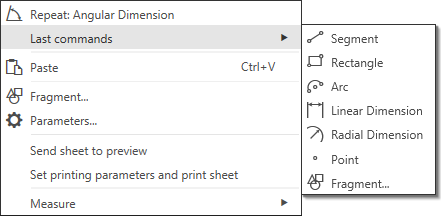
An example of the recent commands list when working in a drawing
Recently performed commands lists are created for the following document types KOMPAS-3D:
•part,
•assembly,
•drawing,
•fragment,
as well as in the sketch mode.
When working with the text editor and with BOM you can redo only one last performed command. The redo command is invoked from the Edit menu.
|
Commands are included in the list regardless of whether they were completed or not. |

The command is not redone if it was invoked with double click on an object.
The number of commands to remember can be set in setting dialog box, in the section System — General using a list Size of the list of recent commands. Selecting the number 1 in the list means excluding the command Recent commands from the context menu.
When the session of KOMPAS-3D ends, the command lists are reset.
