|
Guide curves |
Scroll |
The shape of the lofted elements can be changed by setting the guide curves.
Objects existing in the model – 3D curves, contours, sketches, edges can be used as guide curves. The number of guide curves is not limited.
The figure shows an example of a lofted element, built with and without the use of guide curves.
|
|
|
a) |
b) |
c) |
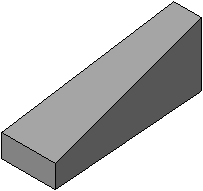
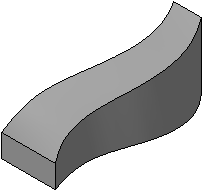
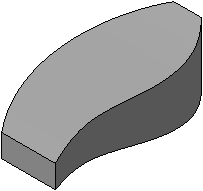
Lofted Element:
a) without guide curves,
b) using one guiding curve,
c) using several guiding curves
To select as guide curve, in the section Guide curves click in the box Curves. Select the desired objects in the Design Tree or in the graphics area. The names of the selected objects appear in the field Curves.
If you need to use a spline as a guide curve that is not in the model, you can create one without interrupting the command. To do this, click the button Spline by poles  to the right of the field Curves. The process of creating spline by poles will launch. You can create a spline of this type or choose another type — spline by poles. Complete the necessary steps to create the spline and finish the construction. The system will return to the original operation, and the created spline will be automatically added to the list of guide curves.
Guide curve requirements
1.The guide curve must be one continuous sequence of segments. If a sketch is specified as a guide curve, it should contain one contour.
2.The guide curve can be closed or open.
3.The guide curve must intersect all sections of the lofted element points belonging to the contours of these sections.
4.The guide curve must intersect the sections in the order in which they are joined when building the element (i.e. listed in Sections on the Parameter Panel).
|
One guiding curve can be represented by only one object. You cannot draw a guiding curve from several connected objects or their parts. |

|
If the guiding curves are open, then only an open element can be built. If the curves are closed, then the element can be either closed or open, depending on the state of the Close Path. |
