|
New attribute type creation dialog |
Scroll |
Allows you to create a new attribute type for later use.
This dialog appears on the screen after pressing the Create attribute type  in the dialogs Attributes and Attribute types.

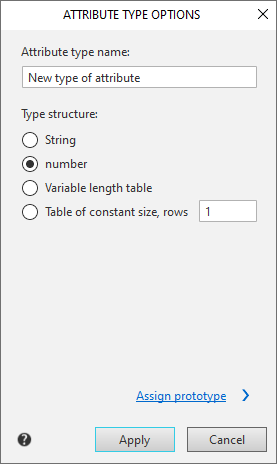
Description of controls
The element |
Description |
|
Type name |
In this field, you must enter or edit the name of the attribute type. |
|
Type Structure |
Use the toggle switches to set the desired attribute type. The following types are supported: •string, •number, •Variable length table, •Fixed length table. Next to the option is a rows field for entering the number of table rows. This field is only available for this attribute type. |
|
Assign Prototype |
The button appears when a variable length table option is selected. After pressing Assign prototype button additional sections appear in the dialog. |
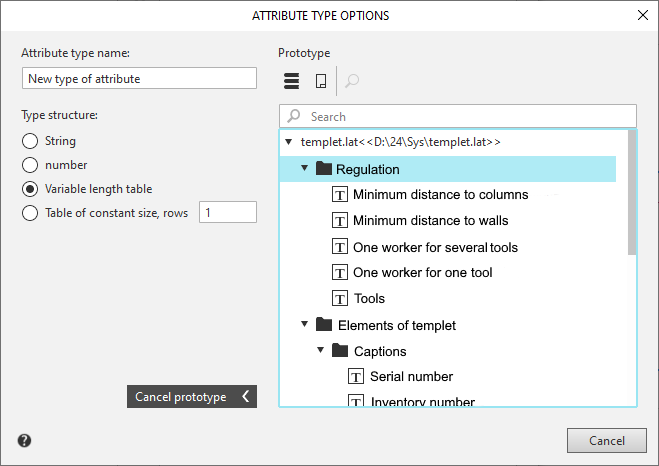
Description of controls for prototype assignment
|
Element |
Description |
|
Show library |
Click this button to display a list of attribute types in the current library. After clicking this button, a standard dialog will appear, asking you to specify the name of the attribute library file. |
|
Show document |
To view a list of attribute types in the current document, click this button. |
|
View |
To view the attribute type selected as a prototype, select it from the list in the current library or document and click the button. A dialog box describing the attribute structure dialog will appear on the screen. |
Search field |
Used to search for an attribute type by its name. |
|
Cancel Prototype |
To reject the selected prototype, click the button. The controls for selecting a prototype will disappear. |


After the description of the new attribute type is completed, click OK. To end the dialog without creating a new type, click Cancel.
