|
Dialog Enter table name |
Scroll |
This dialog is used to enter or edit the name of a table – a regular table, a report table or a BOM table in a drawing.

The dialog contains a field for entering the name. The width of the field is equal to the width of the table for which the name is given.
An associative report can consist of several tables — then the fields for the name of each table are displayed in the dialog. The BOM may consist of several sheets – then two fields are displayed in the dialog: for the name of the first sheet and the name of the subsequent sheets.
|
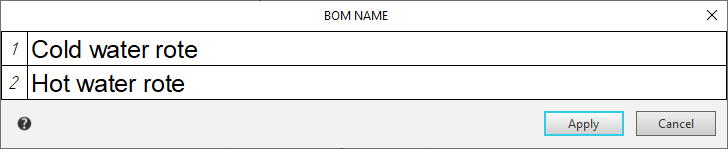
Dialog for entering names of associative tables
Enter text in the dialog box(es).
While this dialog is on the screen, elements are available on the Parameter Toolbar, and in the Main Menu are commands that allow you to work with text. Some of them can also be called from the context menu of the dialog input field.
While this dialog is on the screen, elements for working with text are available in the Options Bar and commands for working with text are available in the Main Menu. Some of these commands can also be accessed from the context menu of the dialog's input field.
Having finished entering or editing the table name, click the OK button of the dialog. The dialog closes, and the specified or modified name appears above the table.
To refuse to enter or edit a name, click Cancel.
