|
The Numeration toolbar |
Scroll |
To work with numeration groups, the Numbering toolbar is used. The display of the bar is managed by the Settings — Bars — Numbering  command.
The toolbar contains a dropdown list of numeration groups, a list of objects of the current group, and the buttons which let change the parameters and structure of groups. Elements of the toolbar panel are available if none of commands is not started.
|
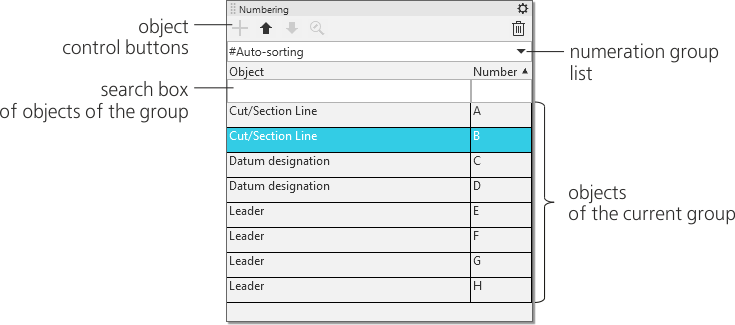
The Numbering toolbar
The list of objects of the current group is displayed on the Numbering toolbar as a table. For each object in the table, the type and number are specified. By default, objects of the group are located in ascending order of their numbers. You can enable display of objects in the decreasing order of numbers. To that end, click the heading of the Number column of the table of objects.
Setting up system numbering group parameters, as well as adding and setting up user groups, is performed using the commands Create group... and Settings... of menu button  . Both of them trigger the setup dialog, which is covered in the section Numbering, at the same time the command Create group... automatically creates a new user group in this section with default settings.
To change of set of group objects and the order of their sequence, it uses buttons for adding, movement, and deletion of objects, located in the heading of the Numbering toolbar. These actions are described in the section Tricks for numeration.
Scale to Selected Objects  button in the panel header lets change the display scale of the document so that in it the object selected on the panel is displayed at the maximum possible scale.
