|
Macro-element defining point |
Scroll |
You can create a defining point in a macro-element.
Defining point is the displacement point and center of rotation of the macro-element.
As a macro-element is edited, a second point is displayed near the defining point. Using the second point, you can modify the inclination angle of the macro-element (see the picture).
|
|
a) |
b) |
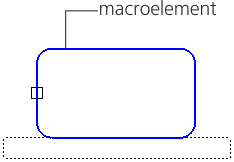
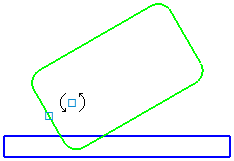
Displaying the defining point
a) in the Macro-element Editing mode; b) then the document is being edited
To create a defining point in a macro-element, use the macro-element The Set characteristic point command serves as the characteristic point. This command is also available in the macro-element editing mode.

Step-by-step instructions
1.Select the macro-element to set the defining point. The name is displayed in the Object field on the Parameters panel.
In the graphic area an image of a point following the mouse cursor will appear.
2.Select the base point location or enter its coordinates in the Point position field. For precise cursor positioning, you can use Snaps and geometrical calculator.
After the position is specified, the defining point is created in the macro-element.
3.To complete operation of the command, click the Finish  .
.
Changing the position of the defining point
After the defining point is created, you can shift it relatively to the macro-element by setting a new position. Use the following procedure.
1.Run the Set characteristic point  command.
2.Select the macro-element with the point. The name of the macro-element will appear in the Object field on the Parameters panel. A phantom of the defining point will be displayed in the graphic area.
3.Unfix the point coordinates in the Parameters panel and select the new position of the point.
4.To complete operation of the command, click Finish .
Deleting the defining point
To delete a previously created defining point from a macro-element:
1.Select the macro-element with the point.
2.Run the Delete defining point command.
This command is available if a defining point has been created in the macro-element.
After the command is executed, the defining point is removed from the macro-element.
