|
Terms and Definitions |
Scroll |
A B C D E F G H I J K L M N O P Q R S T U V W X Y Z
A B C D E F G H I J K L M N O P Q R S T U V W X Y Z
|
CALS (Continuous Acquisition and Life Cycle Support) is a concept and methodology for managing product data throughout its entire life cycle. It uses an integrated information environment that enables consistent and standardized interaction among all stakeholders, including customers (including government agencies), suppliers, manufacturers, and maintenance organizations. The concept is implemented through a set of international standards that establish the rules for such interaction, primarily through electronic data exchange. |
||||
|
DWG is a proprietary binary file format owned by Autodesk Inc., USA. |
||||
|
DXF (Data eXchange Format) is a text data exchange format developed by Autodesk Inc., USA for its software products like the flagship AutoCAD solution. This exchange format has become the de facto standard for drafting systems and is supported by virtually all CAD software. |
||||
|
EMF (Enhanced Metafile Format) is a 32-bit graphics format, It is an enhanced version of the 16-bit WMF (Windows Metafile Format). Developed by Microsoft, the format is used to exchange graphics between Microsoft Windows applications. It supports both vector and raster graphics. |
||||
|
IFC (Industry Foundation Classes) is an open product-to-product data exchange format. It was developed by buildingSMART (International Alliance for Interoperability, IAI). The format is used to import models from one system into another. Read-only geometry, properties, and attributes are exchanged. |
||||
|
IGES (Initial Graphics Exchange Specification) is a basic specification for graphics exchange. This format is used to exchange geometry between CADs and other vector graphics editors. It is developed and maintained by IGES/PDES, an ANSI-accredited organization. This exchange format is the de facto standard for CAD systems and is supported by virtually all such software products. It is mostly used to exchange 3D models. |
||||
OpenGL OpenGL (Open Graphics Library) is a specification that defines a software interface for applications that use 2D and 3D computer graphics. It includes functions for building complex 3D scenes from basic objects. OpenGL is used in video games, CAD, VR applications, visualization, and research. |
||||
|
An object created in a KOMPAS graphics document using the OLE (Object Linking and Embedding) technology. With the OLE technology, an object created in a Windows application can be pasted into another application. Once pasted, the object can be edited as if in its original application.
|
||||
|
SHX font is a vector font used in AutoCAD. |
||||
|
STEP AP203 is a format documented as the ISO-10303 standard (Vol. 21) and application-level protocol. It is designed for data exchange between applications compatible with ISO-10303 STEP. The exchange file is a text file independent of any specific software and platforms. KOMPAS-3D saves data to an exchange file compliant to STEP AP203. The exchange contains geometry definition, and product attributes: Item number, Name, Author, Description, Assembly structure (design tree). Library elements are stored as separate files. The filename of a library element is its name. |
||||
|
VRML (Virtual Reality Modeling Language) is a standard file format for 3D interactive vector graphics viewing. It contains 3D scene definitions with geometric shapes and their locations in space. VRML objects are stored in text files with the wrl extension. |
||||
|
|
||||
|
Absolute coordinate system is automatically created in 2D documents and 3D models.An absolute coordinate system of a document cannot be edited or deleted. |
||||
|
Active view (layer) is a view (layer) whose objects are available for editing and deletion. All objects on the active view (layer) are displayed using a specified style (it defines line thickness and point appearance, for example), and in the color defined for this view (layer) in the Document Tree. Multiple document views (layers) can be active simultaneously.
|
||||
|
Associative hatching (fill) boundaries are linked to specific objects (or their parts). As these objects move, the hatching (fill) boundary is automatically adjusted. |
||||
Associativity Associativity is a unidirectional dependency of an object location/shape on the other object location/shape. |
||||
|
Associative view is a drawing view associatively linked to a model (part or assembly). Associated views are updated automatically as the parent model changes. |
||||
|
Associative report is associatively linked to the document from which it is generated. All associative reports are auto-updated when the objects and/or their properties in the parent document are changed. An associative report can be imported into a geometry document. |
||||
|
Attribute is additional, non-graphics information associated with one or more objects in a document. These can be a number, a text string, or a table with a fixed or variable number of rows. Attribute types (structure definitions) can be stored either directly in the document or in separate files (attribute type libraries). These files have the lat extension. Many applications (e.g., the BOM module, CAE tools, etc.) use attribute values. You can search for attribute values in drawing and fragment documents (Select by properties... command). |
||||
|
Bend reference face is a flat face of a sheet metal part that contains a fold line. |
||||
|
Base point of a 3D object is the origin where the object geometry begins. The software locates the base point automatically depending on the type of object and how it is created. For example, the base point of a component is the origin of its absolute coordinate system, and the base point of a sketch-based operation is the center of mass of the curves in the sketch. |
||||
|
Bend length is the explicitly specified unbent length of the cylindrical part of the bend. |
||||
|
Vertex is a primitive that represents the end of an edge. In general, vertices are coordinate origins, points (also in sketches), control points, and connection points. A special case of a vertex is a zero-length edge (for example, the vertex of a cone). |
||||
|
Point weight is a coefficient that controls the effect of a characteristic point on a spline curve/surface on the shape of this curve/surface. In terms of geometry, it means: the greater the point weight, the closer the curve or surface is to it (points with a large weight “attract” the spline more strongly than points with a small weight). |
||||
|
Parent view is a view in a parent drawing that contains a view inserted from another drawing. |
||||
|
Source view is a view in a drawing inserted into the parent view. |
||||
|
Drawing view is a component of a KOMPAS-3D drawing. It is a container for drawing objects. These objects are also called “a view”. Objects contained in a single view can belong to a single (view, section, cross-section, or detail view) or several elements at once. Theoretically, a drawing can contain a single view with all the geometry. However, it is strongly recommended to split drawing objects across multiple views. The key properties of a view are scale and position. The scale can be selected from a standard range or specified as a ratio of arbitrary numbers. A view position is determined by the coordinates of its base point in the absolute coordinate system and the angle of rotation. Each view can have up to 2,147,483,647 layers to conveniently arrange the geometry. |
||||
|
Visible view (layer) is a view (layer) displayed. Active views (layers) are displayed in their colors, while background views (layers) are displayed using the style selected for them. |
||||
|
Nested BOM subsections are located within a section, after all the objects in that section. Groups of nested subsections are called nested subsection blocks. More about BOM section blocks... |
||||
|
External model variable is a variable in a model accessible for reading/writing from a parent model that contains it as a component. The key purpose of external variables is to control the shape and size of a model during and after its addition to another model. As the user creates a model, they can add variables and set their status to either “external” or “reference”. Only a user-defined variable (from the main section of the variables list) can be external. An external variable is indicated by the icon An external reference variable is visible but is read-only in the containing model. |
||||
|
External fragment variable is a variable in a parametric fragment. It is editable after the fragment is inserted into another fragment or drawing (directly or as an external link). The key purpose of external variables is to control the parameters of a parametric fragment inserted into another document in place without the need to edit that fragment separately. An external variable is indicated by the icon If a fragment external variable also has the “reference” status, then when the fragment is inserted into another document, it is visible but cannot be changed. As the user creates a fragment, they can add variables and set their status to either “external” or “reference”. Only a user-defined variable (from the main section of the variables list) can be external. |
||||
Object selection For many operations, the user have to select objects. For example, to create a 3D geometry feature from a sketch, we should select the sketch; to make a copy of an object, we should select it, etc. The selection colors are specified in the 2D/3D object settings. |
||||
|
Bounding box is a parallelepiped whose faces are parallel to the coordinate planes and pass through the points of the model objects that are furthest apart. The user canselect the types of objectsTo be included in the bounding box. |
||||
|
Geometry calculator is a provides numerical parameters of the objects and their mutual positions. The results can be used to create other objects. |
||||
|
Geometric pattern is a collection of only the faces and edges of the source objects. |
||||
|
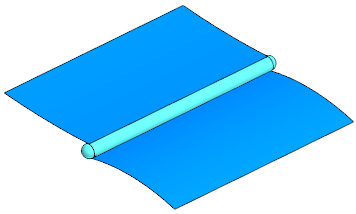
Geometric accuracy is the acceptable (actual) deviation between objects that should theoretically coincide. For example, these are the deviations between: •A point on the edge of a body/surface and a curvilinear edge of the same face, •An end point of the edge of a body and a vertex of the same body, •End points of multiple edges of a body and a vertex of the same body at which these edges should meet. The position of the vertex can be represented as a sphere with its center at its actual position and a diameter equal to the geometric accuracy. The position of an edge can be represented as a “pipe” with a diameter equal to the geometric accuracy.
Vertices and edges whose geometric accuracy is lower than the default KOMPAS-3D accuracy may appear, for example, when surfaces are stitched with low accuracy or when importing a model from a third-party software. The Geometry Validation command checks thegeometric accuracy of model objects. |
||||
Main central coordinate system Main central coordinate system is a coordinate system whose origin coincides with the center of mass of the model (at this points, the products of inertia are zero). |
||||
Main section of the Variable list Main section of the Variable list contains used-defined variables of the current document. These variables are listed at the top of the Variables Panel, on the first level of the list. Users can directlycreateVariables in the main section. Whenentering an expressioncontaining variables that do not exist in the document, these variables are auto created in the main section. |
||||
|
Principal axis of inertia coincides with the corresponding axis of the principal central coordinate system. |
||||
Smooth chain of curves Smooth chain of curves is a chain in which the curves have a common tangent at their connection point. |
||||
|
Face is a primitive, a part of a surface bounded by edges and containing no other edges within. A special case of a face is a closed edge that has no boundaries (for example, a spherical or toroidal face). |
||||
|
Group is a named set of objects in a geometry document. An object can belong to more than one group. |
||||
Layer properties group Layer properties group is a set of settings for multiple layers. These groups are used to change the properties of multiple layers at once in accordance with individual settings for each layer.More about layer groups... |
||||
Layer group Layer group is a static set of layers grouped by some criteria. Layer groups are used to assign identical properties to multiple layers.More about layer groups... |
||||
|
Document tree is a nested list of objects arranged in the order of their creation. The tree represents the document structure. A ”+” icon next to an object indicates that it has child objects. To expand the list, click the “+” icon. The context menus of the Document Tree objects contain frequently used commands for the objects of a particular type. |
||||
|
Envelope tree is a nested list of bounding boxes defined in the document. It contains both envelopes and sub-envelopes. Envelopes and sub-envelope creation operations are at the first level of the tree hierarchy. The second level contains sub-envelopes resulting from the sub-envelope creation. A ”+” icon next to an object indicates that it has child objects. To expand the list, click the “+” icon. The context menus for envelopes and sub-envelopes in the Tree contain the envelope commands. |
||||
|
Version tree is a nested list of model versions contained in the document. It contains dependent and independent versions. All independent versions are at the first level of the tree hierarchy. Dependent versions are children of their parent version. The context menus of the versions in the Tree contain the version commands. |
||||
|
Design Tree (or Model Tree) is a nested list of the model objects, their statuses, and the relationships between them. The Design Tree has two views:1. In the order of model creation2. Structure view: objects are grouped by their types and sorted within groups in the order of their creation. |
||||
|
Fragment tree is a nested list of the fragment objects: layers, macroelements, other inserted fragments and raster images. |
||||
|
Drawing tree is a nested list of drawing views and their objects: layers; macroelements; inserted views, fragments, and raster images; and source model objects for associative views. |
||||
|
Part is a 3D model of a component manufactured without any assembly operations.The document type is “Part”, the file extension is m3d. |
||||
|
Part template is a model component used as a source object for building this model. Part templates are convenient for modeling multiple similar products that differ only in some features. A part or assembly file can be used as a part template. The resulting component can be associated with the source file or not. In the latter case, the part template is stored in the parent model file. |
||||
Dynamic search Dynamic search means automatic detection of objects under the mouse pointer.The rules for such auto-detection are defined in the filters (for models) and also depend on the current operation. |
||||
|
Parent document is a geometry document that contains a fragment or view inserted as an external link. The content of such a fragment or view is not physically copied to the parent document. It stores only a link to the source document. Any change to the source will automatically update the parent document. |
||||
|
Additional BOM sections are attached to the BOM end following all the other sections. Additional BOM sections begin at a new BOM page. Additional BOM sections are grouped into blocks.More about BOM section blocks... |
||||
|
Print job is a file with the pjd extension. It contains the numbers and sizes of sheets/pages, as well as the names of documents to be printed, settings for their placement on the sheet/page, print settings, and output device data. This is a text file; you can view and edit it in any text editor. |
||||
Gap Gap is the distance separating the sides of a closed corner. It is measured in a plane perpendicular to the line of intersection of the faces forming the corner. Any plane perpendicular to the line of intersection of the outer or inner faces, forming an angle, can serve as such a plane. |
||||
Corner angle Corner angle is the included angle between two faces (flanges) forming a corner, measured in a plane perpendicular to the line of their intersection. Any plane perpendicular to the line of intersection of the outer or inner faces, forming an angle, can serve as such a plane. |
||||
|
BOM entry is a text in a BOM cell that may contain multiple fields. |
||||
|
No edit flag indicates whether the object can be edited or not. Use the Edit — Disabled and Edit — Enabled commands in the context menu to manage the object’s status. When editing is enabled, the object can be modified in any available way. There is no icon in the Design Tree for editable objects. When editing is disabled, the object cannot be modified or deleted. Such objects have a shield icon in the Design Tree. In assemblies, the edit status for each component is saved as the assembly load mode.(can be password protected). |
||||
|
Zone is a certain volume in the model space. It is used to select objects inside or outside this volume, or to intersect it. |
||||
Hierarchy of protected assembly load mode If a new protected assembly load mode is created (or password protected) while another protected load mode is selected, then the new load type being created (or protected) becomes a child to the current (parent) one. To delete a child assembly load mode or remove its password, the parent load type must be selected. |
||||
Toolbar Toolbar contains command buttons. |
||||
|
Reference variable is a variable whose value depends on other variables, dimensions, and the position of the objects in the document. Reference variables are marked with the Reference variables can be used in expressions. |
||||
|
Model version is one of multiple model variants stored in a multi-version document. There are dependent and independent versions. A dependent version is linked to the original version. An independent implementation has no such link. The model versions are visually represented as the Version Tree. The Tree is available on the Versions tab of the Design Tree. |
||||
Source image Source image is the document that stores the imported image. |
||||
|
Collection is a set of model objects used in certain operations. Collections are used to select objects when creating their copies. |
||||
|
Component is a model object imported from another model. Components can be parts, assemblies, part templates, virtual parts, and virtual part templates; for assemblies, they can also be standard products and library elements. A component model can be stored in a separate file or in the current model file. The following components are stored in separate files: •parts •assemblies •part templates •standard products •library elements. For these, the current model contains not the components themselves, but links to their files. The current model file actually stores the following components: •virtual parts •virtual part templates. These components are not saved to individual files. They are stored directly in the containing model. |
||||
|
Skeleton component is a result of replacing a component with a skeleton geometry. A skeleton component contains the geometry (geometric objects, components, annotation) imported from the template file, and has the properties (mass properties, name, item number, etc.) imported from the source component file. |
||||
|
Skeleton geometry is a set of model objects that define its key geometric properties (e.g., attachment points, the assembly’s bounding box, or surrounding components that define the available envelope). Parts, assemblies, and virtual parts can be used as skeleton geometry. |
||||
Context menu panel Context menu panel is a toolbar displayed next to the mouse pointer after a mouse click (or after selecting a text fragment in text documents). It contains frequently used command buttons. |
||||
|
Context menu is a right-click menu that contains commands applicable to the selected object or the entire document. |
||||
|
Control point is an object used to specify the 3D position of a pipeline segment path. The property of a control point is its position in the model. A pipeline segment can contain multiple control points. One of the control points must be on the pipeline path. |
||||
|
Contour is a composite object, a chain of curves generated from source objects. As a special case, a contour can contain a single curve. |
||||
Print device configuration file Print configuration file is a file with the pdc extension which contains the current print settings (paper size, manual of auto paper source, page orientation), and print device properties. This is a text file that can be viewed or edited with any text editor. |
||||
|
Copy of geometric objects is a model object that contains history-free geometry copied from geometric objects in the same or another model. The copy can include objects from the model, its components, and the skeleton geometry it contains. |
||||
|
K-factor (neutral factor) defines the location of the neutral sheet layer relative to the thickness. K-factor is used to determine the lengths of unbent sections (as the bend is unbent). The length of the bend’s neutral layer does not change when it is unbent. As the K-factor increases, the neutral layer shifts toward the outer surface of the bend, and the length of the unbent section increases. When the K-factor decreases, the opposite occurs. The K-factor depends on the physical properties of the material, its thickness, and the bend radius.More... |
||||
|
Bézier curve in KOMPAS-3D is a curve composed of smoothly joined segments defined by fourth-order polynomials, each determined by four control points. The outer points of the four are user-defined, while the positions of the intermediate points are calculated to satisfy the continuity condition of the resulting curve. These intermediate points lie on the tangent vector of the curve.The user can edit the position of any control point. |
||||
|
Silhouette edge is a line on a surface where the face normal is perpendicular to the viewing direction. |
||||
Control segment Control segment is an auxiliary line connecting the new (or edited) curve vertex to the previous vertex of the same curve. |
||||
Bend line Bend line is a straight line that defines the position of a bend in a sheet body. |
||||
|
Sheet body is a body created by the Sheet Body, Flange, or Ruled Shell operations. Other sheet metal operations apply to a sheet body. |
||||
|
Virtual part is a model component stored within the model file. A part or assembly can be inserted from an external file as a virtual part. A virtual part can be created in place. |
||||
|
Local coordinate system is a coordinate system arbitrarily positioned and oriented relative to the absolute coordinate system. |
||||
|
Embedded fragment is a fragment created and stored within a parent document. The parent document can contain any number of embedded fragment instances with different scales and rotation angles. Changes made to an embedded local fragment are immediately propagated to all its instances. Embedded fragments are convenient if they are used in one document only. |
||||
|
Simplified representation is a substitute model (part or assembly) that represents a component in an assembly. Simplified representations replace heavy subassemblies in large assemblies to improve performance. A simplified representation contains the minimum possible number of objects to visualize the assembly, position its components, and generate associative views. Only geometry (geometric entities, annotations, and components) is imported from the simplified representation file of the component. Properties such as mass characteristics, name, and item number are imported from the regular component file. |
||||
|
Macroelement is a composite object treated as a single entity. |
||||
|
Multi-sheet drawing is a design document containing several sheets that share the same item number and name. The sheets are sequentially numbered. Some features of a multi-sheet drawing: •By default, the first sheet of a mechanical drawing has the Mechanical Drawing. First Sheet style, and the rest are Mechanical Drawing. Subsequent Sheets. •The item number entered on one sheet is automatically propagated to all other sheets. •By default, sheets and general notes items are numbered continuously. •If enabled, the entire drawing is divided into zones. •Regardless of the number of sheets, the drawing contains only one majority surface symbol and one set of general notes. All sheets of a multi-sheet drawing are saved in a single *.cdw file. |
||||
|
Composite curve is a curve that consists (or may consist) of multiple sequentially connected segments.A composite curve can be selected and used in operations either as a whole (for this, select it in the Design Tree) or as individual segments (for this, select them on screen).Examples of composite curves: polygon, contour. |
||||
View label View label is a text object, a part of a drawing view. The view label text is auto-generated and updated. A view label includes: •alphanumerical view name •the Flattened Pattern symbol •view scale •the Rotated symbol •angle of rotation •sheet number •grid reference.
The user can enable/disable any of the view label elements listed above in the view settings. All elements of the view label are references.
|
||||
BOM name BOM name is the text printed above the components table in the BOM. The BOM name can have multiple lines.The name is user-defined. You can specify different names for the first and subsequent BOM pages (refer toBOM Name of the Drawing). |
||||
Face (plane, surface) normal Face normal is a vector perpendicular to the plane (or tangent plane) at a given point on the face. The normals of a body’s faces are always directed outward. A plane/surface normal can have one of two possible directions. The direction depends on the plane/surface creation sequence and operations used. |
||||
Bend direction Bend direction is the direction of the bend relative to the fixed face. The direction towards the fixed face is direct; the opposite direction is reverse. |
||||
Break direction Break direction is the direction along which the break occurs when a broken view is created. |
||||
Fixed face Fixed face of a bend is the portion of the face that remains stationary. In this portion, the phantom arrow indicating the positive bend angle begins. When the fixed face changes, the position of the arrow changes accordingly. |
||||
|
Point cloud is a set of points obtained by 3D scanning. It is 3D representation of the scanned object. Each point has its X, Y, and Z coordinates. In most cases, point clouds are not used directly, but first converted into 3D surfaces. For this, a triangulation mesh can be created from the point cloud. The result is apolygonal object. |
||||
|
Operation scope is a set of objects that are modified as a result of the operation. •If the operation adds material, its scope includes the bodies and/or components with which the result of the operation is merged. These bodies and/or components merged with the new feature form a body. •If the operation removes material, its scope includes the bodies and/or components whose volume is reduced. |
||||
|
Message bar is the panel at the bottom of the Settings Panel. It shows system messages for the current command or the object under the mouse pointer in the graphics area. |
||||
|
Centerline symbol is represents two centerlines of axisymmetric objects: circles, ellipses, their arcs, rectangles, and polygons. The line style is Centerline. |
||||
|
Clockwise boundary tracing is used to define the boundary of an area or the axis of an equidistant line by sequentially selecting adjacent segments of intersecting curves. |
||||
|
History-free object lacks information about how it was built, and has no links to other objects. History-free objects may result from deleting the model history or exploding a pattern. History-free objects cannot be edited. |
||||
|
BOM object represents one or more consecutive BOM rows that define the same physical object. For basic BOM objects, the row cells are auto-filled, sorted within the containing BOM section, linked to a geometry document (e.g., the part drawing), and can have additional properties. Unlike this, tauxiliary BOM objects are not auto-filled. Auxiliary BOM objects can be used to add arbitrary text (comments) to the BOM, or to add an empty row in the middle of a BOM section. |
||||
|
Revision table object is one or more consecutive rows of the revision table that represent the same change. |
||||
|
Duplicates are BOM objects from the same section that contain identical data in the column (-s) used for sorting.More... |
||||
|
Single-segment curve is a curve that consists of a single segment. A single-segment curve is always selected in its entirety, and any operation applies to the entire curve. Examples of single-segment curves: arc, spiral, and spline. |
||||
|
Report window is invoked by the Create Report command. You can view and edit the data to be included in the report and adjust additional settings for the report. With the Report Window open, you can insert the finalized report into a document, print it, or save it to a file. |
||||
Operation Operation is a way to create or modify an object. |
||||
|
BOM settings control how the BOM data are displayed. The BOM settings include the path to the BOM styles library and a specific style from the library, as well as the mass property settings (unit of measurement and precision). The BOM settings are stored in the document. A single document can contain multiple BOM settings. One of them is current. |
||||
|
Parent view is an associative view in a drawing used to create another view. For example, for projection views, the parent view can be the main view, and for a section, it can be the view that contains the cutting plane, etc. |
||||
Bend relief Bend reliefs are cuts in a sheet body at the corner of the bend. |
||||
Corner relief Corner reliefs is a cut applied when creating a new bend near an existing bend, to eliminate material overlap or tearing at their intersection. It may involve partially removing the adjacent bend, its extension, or any bends formed on that extension. The cuts are created along the direction of the new bend, beginning from a plane perpendicular to the adjacent bend line and passing through the intersection point of the tangency lines of the bends’ cylindrical surfaces. |
||||
|
Centerline is a graphic object representing centerlines. A distinctive feature of a centerline is that it extends beyond its endpoints by a certain distance. |
||||
Neutral plane Neutral plane is a flat face used in the Draft operation to create draft faces. The face selected as the neutral plane must not be parallel to the face to be tapered. The Draft command does not affect the shape, dimensions, and taper angle of the neutral plane. There can only be one neutral plane. |
||||
|
Open edge is an edge on the boundary of a face that shows where the body/surface is not fully enclosed. |
||||
|
KOMPAS-3D applies document formats to geometry and text documents. The sheet format includes the title block and sheet borders. For text documents, the format also includes margins between the text and the border. The formats are stored in system libraries as files with the lyt extension. The user can edit existing formats and create new ones. |
||||
Sheet format Sheet format includes the sheet outline, border, margins, title block, and revision table. The revision table is optional. Formats are stored in format libraries. The library files have the lyt extension. |
||||
|
Report is a table that contains objects properties. Objects for a report are models and components at any level, standard products, library components, bodies, macroelements, imported views, and fragments. The table is auto-filled with the data from the model/geometry document. For instance, a report may contain a list of objects and their properties: name, item number, quantity, position, manufacturer, price, etc. The objects and properties are selected by the user. Properties in the report can be links. A report can also be associatively linked to the parent document. Reports can be imported into drawings, fragments, text documents, and exported to the *.cdw, *.frw, *.kdw, *.tbl, *.txt, *.ods, *.xls, and *.xlsx formats. |
||||
|
Bend parameter defines the length of the bend as a flat pattern. The flat pattern length can be calculated from the K-factor, bend allowance, or bend deduction. |
||||
|
Parametric mode is when parametric relationships and constraints and auto applied as geometric objects and annotation are created/edited. The type of relationships and constraints is determined online from the sequence of object creation or snap operations. The parametric mode in drawings or fragments can be enabled/disabled at any moment. In the parametric mode settings, you can select the types of relationships and constraints that are applied automatically, and disable the auto-creation of other types of relationships and constraints. You can enable the parametric mode either for all documents you open/create, or for each specific document. |
||||
Operation parameter variable Operation parameter variable is a variable that is auto created when you specify a numerical parameter for an operation. The value of the variable is the numerical parameter.Variables of this type can be used to control the operation parameters. |
||||
Dimension variable Dimension variable is created by the user when adding a dimension in a geometry document or sketch. The value of the variable is the dimension.If it is a driving dimension, the variable can control the dimension value. This is not possible for driven dimensions. |
||||
Tab Tab is a flat element attached to a sheet body. A tab is created by extruding a closed sketch to an arbitrary depth or to a depth equal to the current thickness of the sheet body. |
||||
|
Jog flat region is a part of a sheet body between two bends of a jog. |
||||
Surface Surface is a model object consisting of connected faces or a single face. The faces of a surface cannot be faces of any other surfaces or bodies. |
||||
|
Hidden view (layer) is not displayed whether it is active or not.A hidden view (layer) is completely unavailable for any operations.
|
||||
|
Flexible subassembly’s components can be moved within the parent assembly. Flexible subassemblies make it easier to position assembly components.More about flexible subassemblies... |
||||
|
BOM subsection is a group of objects within a BOM section.More about BOM subsections... |
||||
|
Subassembly is a component of an assembly that is also an assembly. |
||||
|
In-document mode is designed to view/edit BOM objects within a document (drawing, fragment, or model). For this, an embedded window opens in the parent document. The window contains the BOM table with its columns and sections. Any objects created and edited in the in-document mode are permanently stored in the document. They can be propagated to the BOM associated with the document. |
||||
|
Polygonal object is a KOMPAS-3D model object that represents rawtriangulatedorothermeshes. This representation is used to precisely define the surfaces of 3D objects with low consumption of computer resources; to import tessellation data from exchange format files, etc. |
||||
|
Custom toolbar is a toolbar created by the user. The functionality of custom and system toolbars isidentical. You can rename a custom toolbar. |
||||
|
Set of custom toolbars is a group of custom toolbars. The functionality of custom and system toolbar sets isidentical. You can also rename a custom set and change the icons. The custom set can be added to/deleted from documents of various types. |
||||
User variable User variable is a variable created by the user. User variables are listed in the main section on the Variables panel. They are not directly linked to object parameters. They are used to access other variables. |
||||
|
Degenerate face point is a face edge degenerated to a point. |
||||
|
NURBS curve order is equal to one plus the max degree of the polynomial basis functions that define the NURBS curve segments. |
||||
|
Snap is used to precisely position objects according to specified conditions (for example, snapping to grid points, control points, or object intersections). |
||||
|
Application library is a plugin that extends KOMPAS-3D capabilities and runs within the product. An example of an application library is a library of standard mechanical components, which significantly speeds up the creation of assembly drawings. An application library is developed in a commonly used Windows programming language (Borland C++, Microsoft Visual C++, Borland Pascal, etc.) using the KOMPAS‑3D SDK. The library is a dynamically linked library (DLL). By default, the library files have the DLL or RTW extensions. You can load multiple libraries into KOMPAS-3D. The libraries can have windows, dialog boxes, and menus. Once a library is loaded, the user selects a function from the library catalog and runs it. |
||||
|
Primitive is an elementary component of an object’s geometry. Primitives: edge, vertex, face. |
||||
|
Connection point is a special object used to define the 3D position of connected (or joined) pipeline components and the orientation of the segment to be attached. The properties of a connection point are its position in the model, the axis that defines the direction of pipeline segment connection at this point, and an additional axis. A pipeline segment can contain multiple connection points. To connect two pipeline segments, connect their connection points and axes (or specify the angles between the axes). |
||||
|
Bend extension is the portion of a sheet metal body adjacent to the bend on the side opposite the bend line. |
||||
|
View annotation is an object in an associative drawing view that contains a dimension, item number, note, or table imported from the 3D model. |
||||
Standard and composite document names Standard document name contains only the basic part of the name. Composite document name contains the basic part followed by one or more extras: version number, additional version number, or document code. |
||||
|
Forming tool profile represent the shape of the stamped feature’s bottom. The profile is defined as a sketch. A thin-walled element created by extruding the sketch contains the side walls of the stamped feature. |
||||
|
Empty row is a row in a BOM table located immediately above or below a section heading. It separates the section heading from the BOM items. You cannot enter text into an empty row. Empty rows in a BOM are required by drawing standards. |
||||
Document area of the application’s main window Document area in the main window contains document tabs. |
||||
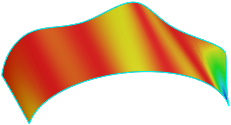
Developable surface Developable surface can be flattened onto a plane without distortion (for example, a cylindrical or conical surface). The Gaussian curvature of such a surface is zero. You can check the curvature of any surface using theCheck Curvature command. For a visual assessment of Gaussian curvature, set the Curvature Map switch to I (On), and select Gaussian in the Visualization Option field. A curvature color map is rendered on the selected surface. Blue means the minimum curvature in the current range of curvatures (Figure 1), while red indicates the maximum curvature (Figure 2).
|
||||
|
Feature dimensions are linear or angular numerical parameters. They can be displayed in the graphics area as dimensions. For example, the numerical parameters of the extrusion feature are the extrusion distance, taper angle, and wall thickness. Feature dimensionsare displayed in the graphics area in the following cases: •when the operation is in progress •in a specialmode when the dimensions of the selected element are displayed. Feature dimensions can be both driving and driven.More... Feature dimensions can be used in annotations (referenced dimensions). |
||||
|
Extended text style is additional data stored in the text style that defines the relationship between the number of text lines (one, two, or three), character height and width, and line spacing. |
||||
|
Edge is a primitive that represents a section of a face boundary between two vertices that does not contain any other vertices within. In general, selected segments of curves and contours are reported as edges. Special edges: •a closed edge with no vertices (e.g., a circle or ellipse) •zero-length edge degenerated into a vertex (e.g., the vertex of a cone). |
||||
|
Reserved row is a BOM row reserved for adding more content in the future. The differences between a reserved row and other BOM objects are as follows: •you cannot enter text in a reserved row •reserved rows are always at the end of a BOM section •reserved rows have item numbers •you can configure the number of reserved rows in each BOM section, or do not add any reserved rows. |
||||
|
Assembly is a type of 3D model that represents a product manufactured using assembly operations.Assemblies are stored in the Assembly type document with the a3d file extension. |
||||
|
Document property is a value that defines the characteristics of a document or the objects it contains. Drawing, fragment, or model documents may have multiple properties. The list of properties is shared for the document and for all objects it contains, but the values of those properties can differ for each object. Scopes of properties: •in geometry documents: the entire drawing or fragment, macroelement, imported view or fragment •in models document: the entire model, component, and body. Associative views in a drawing can access the properties of the parent model.
There are system and auxiliary document properties. System properties are always available resent in the document (such as Item Number, Name, Mass, etc.) Some system properties are filled automatically, while others are user-defined. Auxiliary property stores in an external property library. Auxiliary properties and their values are user-defined. |
||||
|
Connected face set is a collection of faces in which each face shares at least one edge with another face in the set, and each edge belongs to no more than two faces. |
||||
|
Connected curve set (chain of curves) is a collection of curves in which each curve shares at least one vertex with another curve in the set, and each vertex belongs to no more than two curves. |
||||
|
Bend is a non-flat portion of a sheet body. There are cylindrical, conical, and transition bends. Cylindrical bends are created with the following commands: •Bend, •Jog, •Sheet body(from an open sketch). The Shell and Ruled Shell commands create cylindrical, conical, and transition bends.More about shells... |
||||
ISO 10303 STEP series of standards The ISO 10303 STEP (Standard for the Exchange of Product Model Data) series of standards defines methods for representing product data in a neutral format to enable its exchange and sharing across different information environments. The standards include possible implementations and application protocols. To ensure a consistent description of products across various application domains, information models (referred to in the standard as Application Protocols — APs) are developed based on standard building blocks known as Integrated Resources. An application protocol (AP) describes a specific application domain. The ISO 10303 STEP series of standards underpins the concept and principles of CALS, which has evolved into a distinct field of information technology and is now represented by a series of international ISO standards. |
||||
|
Grid is a series of points (or lines) arranged periodically in the graphics area. They facilitate object creation. A grid is a child of a KOMPAS-3D window. The user can hide/show the grid and configure it (color, font, step). Grids are never printed. |
||||
Transparency pattern Transparency pattern represents a transparent object by filling the area occupied by the object with pixels. The color of the pixels is the color of the object when its transparency is zero. The pixels are arranged as a checkered pattern. The Transparency property controls the size of the pattern cells. |
||||
|
PDM is a product data management system. It always includes a DMS (Document Management System). If KOMPAS-3D is integrated with a PDM, then the PDM is used to: •open and save files •select a model file when creating standard and custom associative views •select a model template file •select a file to import a surface •select a component file. |
||||
|
Object coordinate system (CS) is a coordinate system used to define the position or orientation of the object. The CS can be selected when you create or edit the object. The object is always linked to its CS. It moves when the CS moves; it is disabled when the CS is disabled, and it is deleted when the CS is deleted. |
||||
|
System toolbar is available by default. You can move and resize the system toolbars, configure the toolbar commands, add toolbars to toolbar collections, and delete them. |
||||
|
System toolbar collection is available by default. You can rearrange toolbars in the collections, add/remove toolbars, and hide/show the collections. |
||||
|
System menu is displayed as you click the icon in the upper left corner of the window. The system menu contains window size and position commands. |
||||
|
System view is automatically generated in every KOMPAS-3D drawing. This view has a number 0 and a 1:1 scale. Its coordinate system coincides with the absolute coordinate system of the drawing. The scale and position of the system view cannot be changed. |
||||
|
Layer is a group of document objects. Layers are used to control the visibility, editability, and printability of objects in geometry documents. The maximum number of layers in a document is 2,147,483,647. Each layer can have a unique name for easier identification. A document always has a current layer. All new objects are automatically assigned to the current layer. Objects can be moved between layers. |
||||
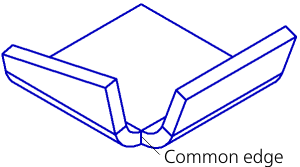
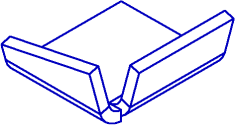
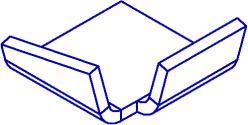
Adjacent bends Adjacent bends have a shared edge, as shown in Figure 1.
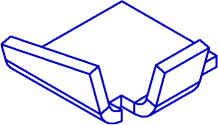
Fig. 1 Bends with corner reliefs, and non-aligned bends are not adjacent. Their corners cannot be closed (Figure 2).
Fig. 2 Flat portions of the sheet part that are modified when the angle is created are called the sides of the closed angle. |
||||
Bend offset Bend offset describes the shift of the bend in the plane of the fixed face. A bend is offset perpendicular to the edge along which the bend is positioned. |
||||
|
Mate is a relationship between a component and another object in the model that defines their mutual arrangement in 3D. |
||||
Mechanical mate Mechanical mate defines how the objects in the model move relative to each other. Mechanical mates are typically used to simulate how mechanisms work. |
||||
Standard mate Standard mate fixes one model object relative to another one. Standard mates are typically used to create an assembly. Standard and mechanical mates can be combined to simulate mechanisms. |
||||
|
The BOM Editor in KOMPAS-3D creates BOM documents (the file extension is spw). |
||||
|
Reference is text associatively linked to another object containing a text property. The linked object is called the reference source. |
||||
|
Reference to variable is used to assign a value from another document (source) to a variable. Within a model, one version can serve as a reference source for another version. |
||||
Home page Home page is used to: •access recent documents •create a new document •tips and tricks •links to the help system and online content. |
||||
|
Style is a collection of object visualization properties. For example, a point style defines the appearance of the symbol that represents the point, and its color. KOMPAS-3D has styles for lines, points, texts, and hatching. There are default styles available out of the box and custom styles. Styles can be stored either in the document or in external files (style libraries). Line style library files have the lcs extension; hatch style files have the lhs extension; and text style files have the lts extension. |
||||
|
Report style is a collection report generation rules that control its content and appearance. Report styles are stored in the Report Style Library (a *.lrt file). |
||||
|
BOM style is a collection of BOM settings that control its content and appearance. For the BOM style components, refer to theStyle Components section. |
||||
|
Revision table contains changes to the document. It is not a part of the title block. |
||||
Bend table Bend table contains K-factor values for different material thicknesses, bend angles, and radii. |
||||
|
Variables table contains external variables. It is store in the document file. A Variables table is used when a file is imported into another document. The external variables of the parent document are assigned the values of the imported file’s variables. The Variables table is user-defined. The Variables table can be exported to/imported from Excel files. |
||||
|
Variable pattern table contains variables of the pattern instances. It is stored in the file. The user can assign new variable values to all pattern instances except the seed instance. Variable pattern tables are not available for mirror patterns and pattern-driven patterns. |
||||
|
The Text Processor in KOMPAS-3D creates rich text documents (the file extension is kdw). Rich text documents contain text and graphics (drawings and fragments). Like a drawing, a rich text document has a border and title block. |
||||
|
Text templates are text fragments stored in external *.tdp files. They contain standard texts for quick entry of frequently used text strings. To manage text templates, use the Text Template Library Panel. |
||||
|
Current layer is the layer to which newly created objects are assigned. In a drawing, new objects are assigned to the current layer of the current view, and in a fragment or model, they are assigned to the current layer. Only one view in a drawing, and only one view in a layer (fragment, model) can be current at a given moment. All object creation, editing, and deletion operations apply to the current layer. Any view (layer) can be current. A current view (layer) becomes visible (and foreground in geometry documents). As long as a view (layer) is current, it cannot become hidden or background. After another view (layer) becomes current, the status of the view (layer) that was previously current is restored. For example, once View 1 was current. View 2 was a background view and visible. Then View 2 was made current, as a result of which it became a foreground view. Once View 2 was edited, View 1 was made current again. View 2 became a background view again. |
||||
|
Current BOM style is the currently active BOM style. Use the BOM Format dialog box to select the current BOM style. |
||||
|
Body is a model object that has a certain volume and material. Unlike a component, a body is not stored in a file. A body can consist of one or more disconnected solid regions. A model can contain one or more bodies. |
||||
|
Nominal surface is an exact mathematical definition of an object face used in KOMPAS-3D. Faces of Body and Surface type objects have nominal surfaces. Face boundaries (edges) and their positions on the nominal surface are additionally defined. |
||||
|
Mesh generation is dividing a surface into polygons to create a mesh. To increase the level of detail, each polygon can be further divided into more polygons, which can also be displaced. |
||||
|
Manufacturing assembly contains manufacturing information such as model dimensions adjusted for tolerances, features added to facilitate manufacturing (center holes, mounting holes, etc.), and tooling (steady rests, lathe centers, tools, etc.) |
||||
Component load types Component load types differ in the amount of data loaded into the RAM. The following system component load types are available: •full: the component is loaded completely; it is displayed in the Design Tree and graphics area •lightweight: the component is loaded so that it is displayed in the Design Tree. In the graphics area, it is displayed without silhouette lines and with reduced accuracy (i.e., less “smooth”) •bounding box: the component is loaded so that it is displayed in the Design Tree. In the graphics area, it is represented by its bounding box •empty: the component is not loaded; it is only displayed in the Design Tree. The lightweight, bounding box, and empty load types improve performance (model rebuilding, rendering after a rotation or translation, etc.) in large assembly models. The user can also enable full loading only for the subassembly they are currently working on, and unload all other components, or, if they need to see their location in the assembly, display only the lightweight or bounding box representation. For subassembly components, both system and custom load types are available. |
||||
|
Assembly load type is a collection of the assembly component load types. The system load types (Full, Lightweight, Bounding Box, and Empty) are available in any assembly. When a system load type is applied to an assembly, it propagates to all the components. You can create a custom load type for the assembly. It is a combination of different load types for different components; Also, the custom load type includes the “no edit” flag for each component. The assembly load type can be password-protected.More... |
||||
|
Triangulation mesh is a discrete representation of the surface of a 3D object as a set of connected triangles. A triangulation mesh completely defines the surface of an object with a given accuracy. |
||||
|
Triangulation is a special case ofmesh generationwhen the surface is divided into triangles, and adjacent triangles share a common side. |
||||
Object selection Object selection is used to perform certain operations. For example, to create a sweep feature, you need to specify the path; to add a parallel segment, you need to specify a straight object to which the segment must be parallel. The selection highlight colors are configured in the 2D/3D editor settings. |
||||
Draft faces Draft faces are flat or cylindrical faces that are angled relative to the reference plane by the Draft operation. There may be multiple draft faces. They can be either adjacent or not. |
||||
|
Bend deduction is the BD value in the equation used to calculate the flattened length of the cylindrical part of a bend: l = 2•a-BD. For more information on bend length calculation from bend deduction, refer to... |
||||
|
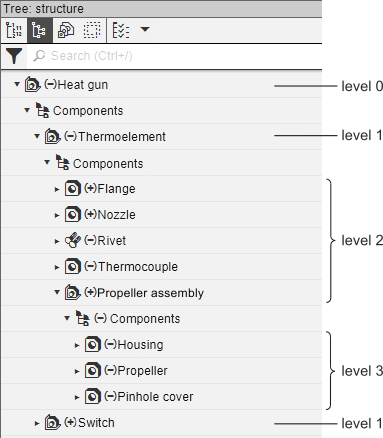
Assembly levels are the nesting levels of the assembly components. The hierarchy of assembly components is represented as the Assembly Tree. The main assembly is at the topmost (zero) level; this is the root element of the Tree. Other components are arranged on the subsequent levels. First-level components are the components imported directly into the main assembly. Second-level components are components imported into a first-level component, and so on.
|
||||
|
Proxy object is a representation of an object (face, edge, vertex) that mimics the position of a regular or skeleton component. A proxy object is created when a regular component is replaced by a skeleton component to apply mates within an assembly. It is also created when a skeleton component, with mates applied, is reverted to a regular component. A proxy object mimics the position of the original object when a mate/operation is applied. Proxy objects are created and stored in the assembly. |
||||
|
Phantom is an image displayed during certain operations to indicate the current state of the objects being created or edited. For example, if we create a line segment, a phantom representing the future segment is displayed while the user is specifying the second point. When you move the mouse pointer, the phantom is dynamically updated to represent the new position of the future segment. When multiple possible objects exist, several phantoms are displayed at once. One of them is active. The object represented by the active phantom will be created as the user confirms the operation. To make a phantom active, click it. By default, the active phantom is displayed in solid black lines, and other phantoms are displayed in black dotted lines. The color and style of phantoms can be configured in the settings. |
||||
|
Layer filter is a dynamic collection of layers that meet some filter criteria.More... |
||||
|
Background view (layer) is a view (layer) whose objects can be referenced for assembly constraints only. These views (layers) cannot be moved, and they are read-only. All objects on background views (layers) are displayed with the same configurable line style. The styles selected for objects when they were created do not apply. A view (layer) is usually made a background view (layer) when it is complete and serves as a “substrate” for adding other objects. Multiple views (layers) in a document can be background views (layers).
|
||||
|
Fragment is a KOMPAS-3D document (the file extension is frw). It differs from a drawing in that it has no drawing format. A fragment does not have a border, title block, majority surface finish symbol, or general notes. A fragment, like a drawing view, can contain up to 2,147,483,647 layers. A fragment is usually used for images that do not need to be formatted as a drawing (concept designs, etc.) You can also save typical designs as fragments for reuse. Note that in KOMPAS-3D, you can import a fragment file as a link without physically embedding it into the parent document. In this case, when the fragment is edited, the parent document is automatically updated. |
||||
Handle Handle is a user interface element displayed in the graphics area when you are creating or editing an object. Handles are used to control the object position and shape. |
||||
Center of mass coordinate system Center of mass coordinate system is a coordinate system whose origin is at the model’s center of mass and whose axes are parallel to those of the absolute coordinate system. |
||||
|
Drawing is the main 2D geometry document in KOMPAS-3D. A drawing is stored in a binary format file (the file extension is cdw). Each drawing can contain one or more sheets, views, and layers. A drawing uses a sheet format containing the border and title block. It also contains drawing annotations: general notes, and the majority surface finish symbol. |
||||
|
KOMPAS document template contains format, settings, objects, layers, etc. used to create a new document. Document templates available in KOMPAS-3D out of the box are stored in the \Templates subfolder under the KOMPAS-3D installation folder. You can create custom templates. |
||||
|
Standard products (e.g., screws, washers, fittings, etc.) and materials (e.g., C-beams, paper, CAF, etc.) have designations whose structure is defined by GOST and other standards. KOMPAS-3D includes designation templates for such standard components (washers, C-beams, etc.). They are masks with fields to be filled. The template also specifies which fields are used to sort objects of a given type and in what order. When a standard product/material is added to the BOM, some fields of the template may be left blank (for example, if a screw has no coating). For standard products, the Name column of the BOM is auto-populated with a text string containing the filled-in fields of the standard product’s designation. |
||||
|
Pointer step is the distance the pointer travels after a single press of an arrow key. The pointer step is configurable. The user can set any step. |
||||
Feature Feature is an object that adds or remove material of a body. There are geometric and auxiliary features. |
||||
|
Sketch is a model object created on a plane or flat face using the graphics editor tools. |
||||