|
Assembly load modes |
Scroll |
Assembly download type is a combination of assembly component loading types.
Assembly load types are divided into System and Custom.
The following system load types are available in each assembly: Full, Empty, Simplified, Partial, Size. If you select one of them, all assembly components will get the same name load mode.
A custom assembly load mode is a combination of system load modes for various assembly components composed by the user.
With a partial load, you can free computer resources to speed up your work with models of large assemblies.
You can assign password protection for any assembly load mode (see section Passwords of Load Modes).
|
|
a) |
b) |
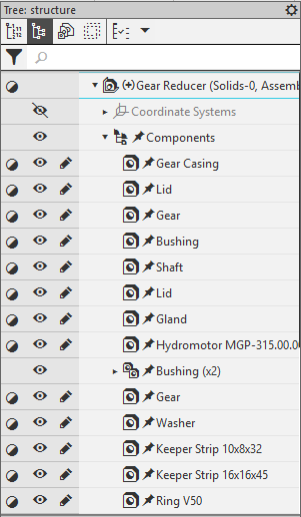
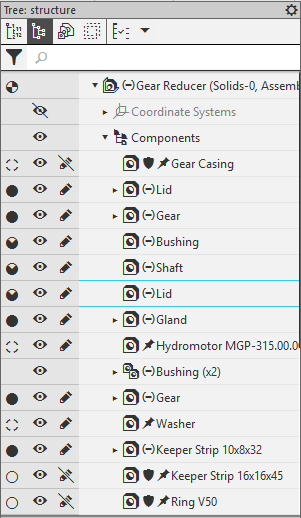
Examples of assembly load modes:
a) system simplified, b) custom
The load mode selected for the assembly is considered applied. By default, this is a system load type Full. You can select another load mode, either system or custom. To learn about applying load modes, see section Select Assembly Load Mode.
You can also change the load mode of one or more components in the current assembly session. In this case, the assembly load mode icon will be marked with an asterisk (*), as shown in the figure below.
|
The asterisk by the loading type icon appears not only after the user changes the load type of a component, but also when inserting a subassembly component with an incomplete loading type into an assembly, as well as when an automatic change from incomplete to full loading occurs (see Automatic change of loading type to «Full»). |

|
Display of the assembly load type in which a load type for a group of components is different from the applied one. |
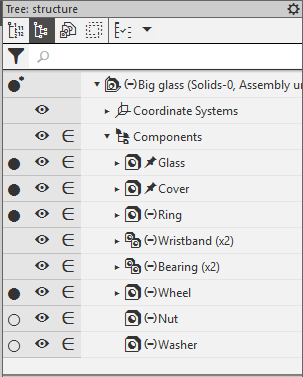
You can then save the modified assembly load type or choose not to save it. If a custom load type is applied in the assembly, you can write changes to this load type or create a new custom type. If a system type is applied to the assembly, a new custom load type will be created as a result of saving (see Creating a custom load type when saving a document).
|
Any change of a load type in an assembly is considered editing the assembly, so even if no other actions have been performed in the assembly, you are prompted to save the document when you close it. When you save an assembly in which you have changed the load types, you are prompted to save the changes. Read more... |
Any type of assembly download can be password protected (see Download type passwords).
See also
