|
Control of load modes |
Scroll |
The Load types process can be run in an assembly model for the assembly itself and for its constituent subassemblies.
|
If the process is called for a subassembly, all actions are performed with the load types of this subassembly. The changes made are passed to the source file of the subassembly. |


The following actions are available in the Load modes process:
•Applying the desired load type to an assembly (subassembly).
•Creating a custom load type.
•Editing the load type (systemic or custom).
•Deleting a custom load type.
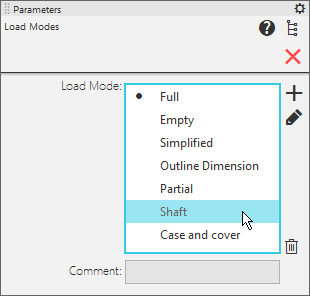
The Parameter panel displays the controls shown in the figure.
|
Parameter panel to work with load types |
Description of controls
|
Name |
Description |
|
Load modes |
The field contains a list of all boot types (system and custom) available in the build (subbuild). The applied boot type is marked with the If the boot type of one or more components of the assembly (subassembly) has changed in the current session, an asterisk (*) is shown next to the |
|
Create |
The button allows you to create a new custom load type for the assembly model. Calls the Create load type dialog box. The current types of loading components of the assembly are written into the created loading type. Therefore, before calling the dialog, assign the required types to the components; if necessary, impose/remove the prohibition to edit certain components. In the dialog you can set the type name, comment, set the password. |
|
Edit |
The button allows you to edit the load type of the assembly model. Opens the Edit load type dialog box. For the system type, changing the comment and password is available. For a custom type it is available to change the name, comment and password. In addition, it is possible to write information about the current state of the assembly (load types and prohibition to edit components) to the editable loading type. Therefore, before calling the dialog, assign the required types to components; impose/remove the prohibition to edit certain components. |
|
Delete |
The button allows to delete a custom loading type. It is present on the Parameters panel, if a line containing a custom type is highlighted in the Load type field. |
|
Comment |
Field for viewing the comment to the selected type (the comment is set: for system type — when editing it, for user type — when creating or editing it). |
 icon to the left of the type name. You can apply a different boot type to the assembly (subassembly) by clicking in the line of the required type to the left of its name.


After performing all necessary actions with the assembly (subassembly) load types, click the Finish  button on the Parameter panel.
See also
