|
Create/Edit Load Mode dialog |
Scroll |
It allows to create/edit assembly Load types.

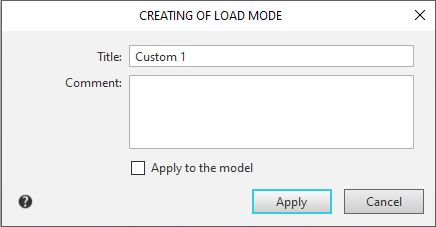
•Dialog Creating of load mode appears on the screen after clicking Create  button located to the right of the field Load type on the Parameters panel in progress Load types, or if the response to the request to save the load mode is positive during the process of saving the assembly.
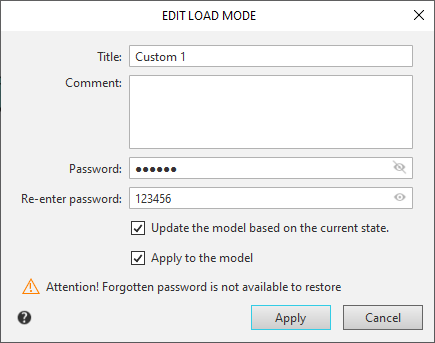
•The Edit load mode dialog appears on the screen after clicking the Edit button.  , located to the right of the field Load type on the Parameters panel in progress Load types.
Description of Controls
The element |
Description |
|
Name |
This field displays the type of assembly load. The field is available when creating and editing a custom load mode. Enter Name. The default name of a custom load type is Custom No. (No.=1, 2, 3, etc.). When editing the system load mode, the field is not available. |
|
Comments |
This field displays a comment. Entering a comment is optional. |
|
Password |
The field to enter the password type of download. When creating a field is available if the password is set to system boot types. By default, when creating the field is empty – there is no password; when editing a protected type of save, the field contains the characters by default. •To protect the load mode with a password, enter the characters in the field. •To make the load mode unprotected, remove all characters from the field by clicking on the icon •To edit a password, remove all characters from the field, by clicking on the icon •If you want to hide/show the password, click on the icon Hide If you do not need to enter or edit a password, the field Password should be left unchanged. |
|
Update the model based on the current state |
Password confirmation field. The field appears in the dialog when setting and changing a password. |
|
Update to the current model state |
The option is in the dialog when editing custom load mode. When this option is enabled, the type of loading of the assembly is formed according to the current state of the assembly, with the option disabled, the state of the assembly with the type of loading applied. The state of an assembly is determined by the loading of its components, as well as prohibition on editing them. |
|
Apply to the model |
Creation/editing is on, the type of load will be applied to the model. If the option is disabled, the type of load applied remains the same as before the creation/editing. |

 /
/
After entering the parameters, click OK. If a new password has been set, enter it again in the dialog that appears.
To exit the Create/Edit loading type dialog without changing the settings, click Cancel.
See Also
