|
Modes of building a line of complex cut/section |
Scroll |
During creation of the line of a complex cut/section, the following operation modes are possible: Creationand Edit.
After invoking the command to create a line of complex cut, the Creation mode is active, and on editing a formerly created line – the Edit mode.
In the Creation mode, the points of cut/section line are indicated.
The Edit mode is used to change configuration of the line of cut. You can edit the configuration of the line of cut by changing the position of its defining points with the mouse in the graphic area. Defining points are displayed on the designation phantom as blue small squares and circles.
In the editing mode you can:
•change the position of the vertices of the cut line,
•create kinks on the constructed segments,
While creating a cut line, you can switch between operating modes. To do this, use Creation/Edit toggle switch. It is available if at least two lines of cut are indicated.
Change of position of vertices
Change of position of vertices of the line of complex cut is performed in the Edit mode.
Movement of the vertex is performed using the characteristic point.
Move the cursor to the point  at the vertex of the cutting line. When the cursor takes the form of a quadrilateral arrow, press the <Enter> key, or left-click it, – the point will be selected.
You can change the position of points using the following ways.
•Dragging a point with the mouse.
Click the left mouse button on the point, and without releasing it, move the cursor to the desired position. Then release the mouse button.
•Moving a point using the keyboard.
Move the cursor using the arrow keys. Then press <Enter> to undo selection.
•Setting the coordinates of a characteristic point.
Enter new coordinates of the selected point into the Current Point field on the Parameter Panel.
Creation of kinks on the existing segments of the line of cut is performed in the Edit mode.
To create a break, the point  at the midpoint of the segment of a cutting line is used. Select a point and move it to the required place. The segment of the line of cut will be broken into two parts. At the vertex of the kink, point will appear, and in the middles of the obtained segments — points .
|
|
a) |
b) |
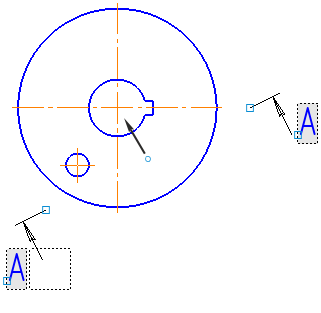
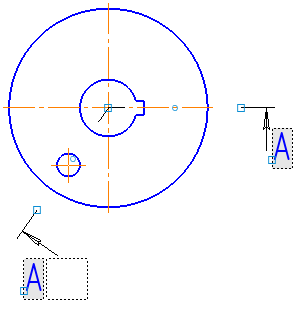
Generation of the cut line bend in the mode Editing:
a) movement of the defining point b) result
Deletion of the vertices of the line of cut is performed in the Editmode.
Select the point in the vertex of the cut line, then press <Delete>. The defining point will vanish, and the cut line will be rebuilt as per the position of the remaining points.
