|
Operation result depending on section object and operation application area |
Scroll |
The result of the Section operation depends on the selected cutting object(s) and the objects included in the application area of the operation.
The scope of the operation is the set of objects which material will be deleted as a result of cutting off a part of the model. Specifying the application area is required if the model contains several bodies and/or components.
By default, the application area of the Section operation — All objects. In this case, the list of objects is generated automatically, as described below.
If you want to manually generate a set of objects that make up the application area of the operation, choose the Selected objects method. Details about ways to form set of objects…
Coordinate or auxiliary plane, flat face
The trimming boundary is a plane. The application area includes objects that the plane intersects, as well as objects that are entirely located on the trimmed side.
An imported or modeled surface, solid, non-planar face, connected set of faces, or a set of faces that fit together
The trimming boundary is a surface (in the case of a body, the surface of this body). The scope of application includes only objects that the surface intersects completely. Objects that are entirely located on the trimmed side and objects that are partially intersected by the surface are not included in the application area of the operation and remain in the model.
Sketch
The following sketch-based trimming options are available:
•By contour — the trimming boundary is the surface obtained by extruding the sketch. The application area includes objects that the surface intersects completely and objects that are entirely located on the trimmed side. Objects that are entirely located on the trimmed side are defined as follows.
Through the extreme points of the sketch contour, planes are built that are perpendicular to the contour at these points (see figure). Objects located on the side of the cut and not intersected by these planes are included in the application area. Objects that the planes intersect are not included in the application area of the operation and remain in the model.
|
|
a) |
b) |
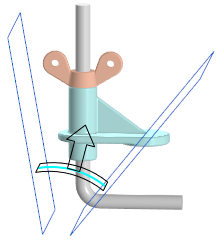
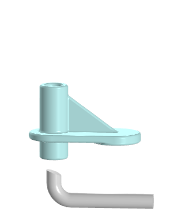
Section of the surface obtained by extruding the sketch:
a) application area boundaries, b) trimming result
•By plane — the trimming boundary is the sketch plane. The scope includes objects that the plane intersects, as well as objects that are entirely on the trimmed side.
