|
Trimming of original surfaces. Knitting with fillet surface |
Scroll |
You can trim the original surfaces with a fillet surface. It is also possible to stitch truncated surfaces and fillet surfaces into a single surface. To do this, use the buttons in the Source faces group in the Design section of the Parameter panel. The following options are possible:
 Leave it unchanged — the original surfaces are not trimmed.
 Trim by rounding — the original surfaces are trimmed by the fillet surface along contours consisting of the boundaries of the fillet surface lying on the original surfaces and the intersection curves of these surfaces with the section planes containing the lateral edges of the fillet surface. In cases where the boundary of the fillet surface does not reach the boundary edges of the original surface, additional trimming is performed..
 Knit with rounding — the original surfaces are trimmed (see. variant Trim by rounding) and are knitted with the fillet surface, forming a single surface. The created surface acquires the properties of the original surface/body, which was specified first when building the fillet.
If trimming or knitting cannot be performed for some reason, a corresponding warning appears on the screen when creating a fillet surface. In this case, it is recommended to select the option Leave it unchanged.
Additional trimming of original surfaces
Additional trimming of the source surfaces is performed by an end or tangent plane. The switch Support trimming is used to select the required plane.The switch is displayed in the Parameter panel if in group Source faces the variants Trim by rounding or Knit with rounding are selected.
By default, the switch is in the position Bottom plane, in which case the original surface is trimmed along the intersection curve with the plane containing the side edge of the fillet surface, until it meets the boundary curve of the fillet surface.
In the switch position Tangent plane the original surface is trimmed along the intersection curve with the plane formed by the tangent vector to the fillet surface boundary at its final vertex and the normal vector to this surface at the same vertex. For example, the figure below shows the fillet between surfaces 1 and 2. Surface 1 is trimmed along the fillet surface boundary, and surface 2 requires additional trimming.
|
|
|
a) |
b) |
c) |
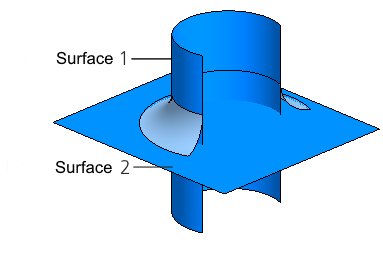
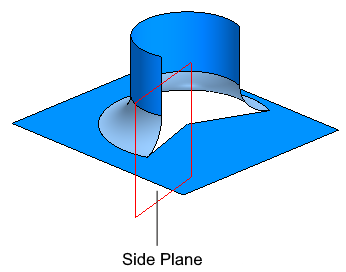
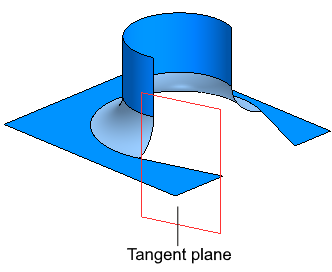
Trimming of original surfaces:
a) source surfaces and fillet surface,
b) trimming with support trimming by the bottom plane,
c) trimming with additional cutting by tangent plane
