|
Special Print |
Scroll |
|
Special printing is available only when running on Windows. |

Using special print, you can output the current document to printing devices which allow you to adjust the size of the print page according to the document sheet on the fly, during the printing process. For example, you have a multi-sheet document with sheets of various sizes. When using the Special Print feature to output this document to a virtual XPS printer, an XPS file will be created, and the size of the pages in this file will match the size of the sheets in the document.
When you use the Special Print feature for printing fragments and models, a single-page document is created, and the size of this page matches the dimensions of the image of this fragment or model.
|
When you print a multi-sheet document with different sheet formats in a regular way, it may be required, depending on the configured print page size, to split the document sheets into several parts (according to the size of the print page) or to group several sheets in one print page. |
Setting up and Printing Documents
To set up special print and to print the current document, use the Special Print...  .
.

After you run the command, the Special Print Document dialog box appears on the screen.
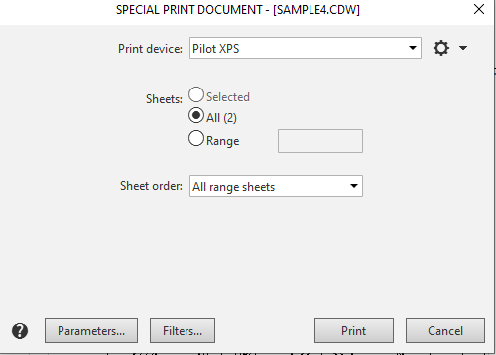
Special Print Settings dialog box
Using the dialog controls, you can select and configure the print device, specify the portion of the document to be printed, and set print options and filters. A description of the dialog controls is provided in the Special Document Printing Dialog section.
After configuring the special print settings, click the Print button to start printing the document to the specified device. To close the dialog box without printing the document, click the Cancel button.
|
If you select a printer for special printing that does not support resizing pages during printing, the document will be printed exactly as it would be during normal printing—on pages with the default page size for that printer. |
