|
Breakdown of technical notes into pages |
Scroll |
The text of technical notes is automatically placed above the title block of the first or last sheet (depending on the setup, see section Technical notes – Parameters) sheet. If the whole text does not fit, then automatic breakdown of technical notes into pages and their location with the left shift is performed.
In case the text of technical notes goes beyond the format boundaries set the large drawing format. In case of large technical notes (for example, for large assembly units of construction projects) consisting of ten or more pages, it is reasonable to execute them on a separate sheet in the form of a text document (to learn more about creation of text documents, see section Creation of a text document).
If necessary, you can forcedly split technical notes into pages and separately place them on a drawing field.
To do this, enter the technical notes location mode and reduce the vertical size of the technical notes marquee (see section Location of technical notes in the drawing). Around that part of technical notes which did not fit into the marquee (on the first page) a new marquee (the second page) will be created.
The second and subsequent pages of the technical notes are automatically located on the free area of the sheet according to standard rules.
The example of splitting technical notes into two pages is shown in the drawing.
|
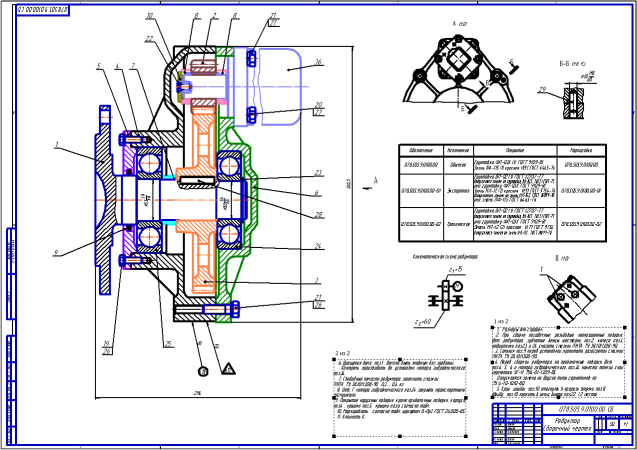
Splitting of technical notes into pages
It is possible to execute a reverse operation. If you stretch the initial marquee to the required sizes, then the whole text will be located on it again, and the additional frames will be deleted.
To restore the default dimensions and positions of pages of technical notes, invoke the Auto Locate command from the context menu.
During autolocation, the width of technical notes equals to width of the title block (with a 5 mm on the left and on the right). Their first page is located above the title block. If he sheet height does not allow to place technical notes in one column, subsequent pages of technical notes are generated and which are located to the left of the title block.
Depending on the setup (see section Technical notes – Parameters) The default location for technical notes may be the first sheet or the last sheets of the drawing.
