|
"Reset Settings and Options" Dialog |
Scroll |
This dialog box appears on the screen after you select the Reset... command
The dialog allows you to reset various settings and options to their default values of KOMPAS-3D.


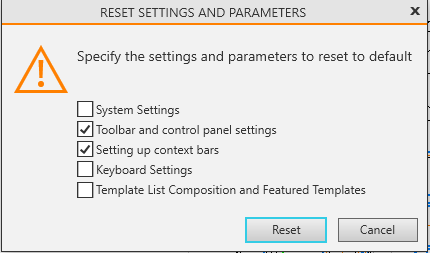
The dialog controls are described in the table.
Description of Controls
Element |
Description |
|
System Settings |
Enable this option to reset the system settings, i.e., the settings specified in the System section of the General Settings dialog box. |
|
Toolbar and control panel settngs |
Enable this option to reset the settings for toolbars and control panels. |
|
Setting up context bars |
Enable this option to reset the settings for the context bars. |
|
Keyboard Settings |
Enable this option to reset the keyboard shortcut settings. |
|
Template list composition and featured templates |
Enable this option to reset changes to template configurations and the set of favorite templates. |
|
|
|
|
Once you have finished making your selection, click the Reset button. To exit the dialog without changing the parameters or settings, click the Cancel button.
