|
Displaying variable names in dimensions |
Scroll |
If a dimension has a variable, the name of that variable appears in its dimension text. The variable name is enclosed in parentheses and appears below the dimension line (see figure). It is not printed.
|
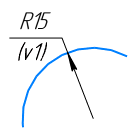
Displaying the variable name in a dimension label
If the value of a control dimension variable is specified as a constant, an expression, or a negative number, the dimension line displays both the variable name and its value, for example: v44 = a + b (see figure).
For an informational dimension, only the variable name is displayed.
|
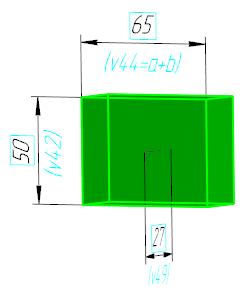
Example of an expression being displayed in a variable's value
The names of variables assigned to dimensions are displayed on the screen when the show variable names in dimensions mode is enabled. To turn this mode on or off, use the command Names of variables in dimensions  .
.

When this mode is enabled, dimension-specific variable names are displayed below the dimension lines:
•dimensions of sketches and operations,
•derived dimensions—sketch or feature dimensions presented as styling elements,
•associative dimensions in a drawing, section, or sketch.
You can also enable (or disable) the permanent display of variable names in dimensions. To do this, use the option Always show dimensions with variables, fixed dimensions, and points in the settings dialog:
•If this option is enabled, variable names are displayed below dimension lines regardless of whether the option to show variable names in dimensions is enabled or not;
•If the option is disabled, variables are displayed below dimension lines only when the "Show variable names in dimensions" mode is enabled.
See Also
Dimension variables in drawings and sketches
Control and information dimensions. Dimensions with variables
