|
Display of the object caption in the graphic area |
Scroll |
For certain objects of a model, captions containing names of these objects can be displayed in the model graphic area. These objects include:
•constructive and coordinate planes and axes,
•control and attachment points,
local coordinate systems.
|
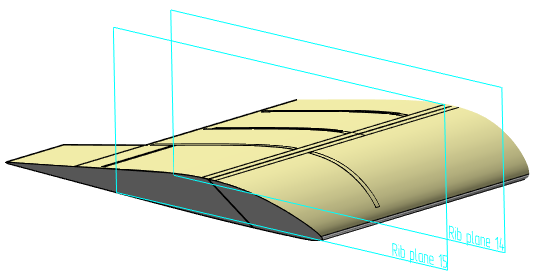
Example of display of a constructive plane name
|
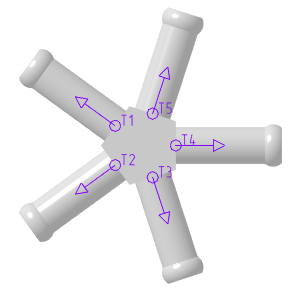
Example of display of an attachment point name
You can display a caption in the graphic area with one of the following methods:
•When you build or edit an object or set its properties, set the Yes toggle switch on the Parameter Panel to I (enabled).
•Select the object(s) in the Model Tree or in the graphic area. Enable the display of the Parameter Panel and in the Properties section, select the Yes option from the Yes list.
The caption containing the name will be displayed next to the object in the same color as it (the font of the caption is determined by the setting Default font).
The display of the label in the graphic area has the following features:
•If the name of an object in the Tree changes, then it also changes in the graphic area.
•When you click on the caption in the graphic area, the entire object is highlighted. This is useful when selecting small objects such as dots or LCS.
•The caption at the LSK, control point, or connection point is displayed at any scale of the model image.
The caption on the plane or axis stops being displayed on the screen if the object's dimensions in pixels become smaller than the size set in the system.
Please note that when copying planes and axes, the caption state in the original object (show/not show) is transferred to the copy object. You can change the caption status of a replica object. To do this, select a copy in the Model Tree, call the Properties command from the context menu, and specify the desired caption state. More about creating geometric copy objects...
|
If required, you can simultaneously hide captions in the graphic area for all objects (planes, axes, control and auxiliary points and LCSs) for which they are displayed. To do this, run the View — Hide — Object Captions command and/or View — Hide in Components — Object Captions command. |

