|
Row (number) Attribute editing dialog |
Scroll |
Allows you to enter or edit the content of an attribute of type row (number).
The dialog box appears on the screen after you click the Copy button  or Edit
  of the dialog Attributes.

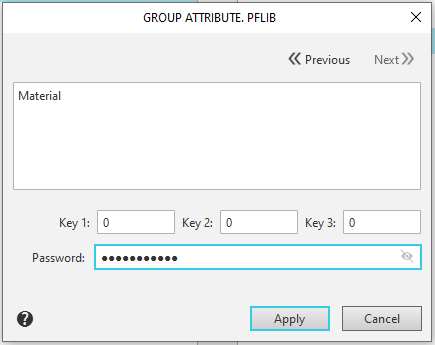
Enter the row value in the corresponding dialog box. If the input is performed for the first time, the default value set when creating the type is suggested.
Description of Controls
The element |
Description |
|
Key 1 Key 2 Key 3 |
Fields for specifying key values for an attribute. |
|
Password |
A field for entering a password to access an attribute-type structure. The password is entered, for example, to protect the structure from unauthorized editing. |
|
|
Next Previous |
You can move sequentially from one object attribute to another using the arrow buttons. These buttons are available if the document or selected object has more than one attribute. |


After entering the attribute data, click the Apply button. To exit the dialog without changing the attribute content, click the Cancel button.
