|
Dialog for setting up writing parameters to PDF (model) |
Scroll |
This dialog appears on the screen after pressing the button. Parameters when exporting a file to PDF.
The dialog allows you to set up the parameters of writing a model to PDF.

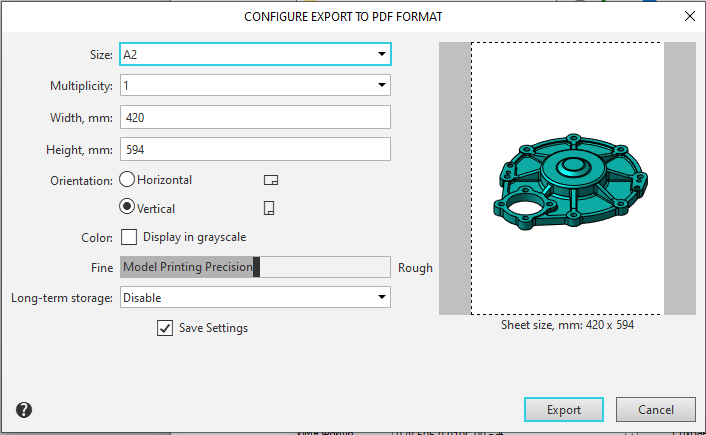
Description of Controls
Element |
Description |
||
Format |
A list from which you can select an image format. |
||
Multiplicity |
A field where you can enter or select a multiple of the standard sheet size. |
||
Width, mm |
Field for entering the document page width. |
||
Height, mm |
Field for entering the height of the document page. |
||
Orientation |
A group of controls that allows you to select the orientation of the document page for printing. |
||
|
Horizontal |
An option that, when enabled, sets the document page to horizontal orientation. |
|
|
Vertical |
An option that, when enabled, sets the document page to vertical orientation. |
|
Color |
To record color tones as shades of gray, enable the Display in grayscale option. |
||
Model Printing Precision |
The element allows to change the model printing precision. To edit the printing precision, move «slider» between the Rough and Fine positions. |
||
Long-term storage |
A list from which you can select a format for long-term storage of a PDF document. |
||
Save Settings |
An option that allows you to save your specified PDF export settings for future use. |
||
Preview Window |
The window is used to display the page. |
||
Once you have finished configuring the settings, click the Export button to start recording. To cancel the recording, click the Cancel button.
