|
Optins of conversion to IGES format |
Scroll |
A dialog box appears on the screen when exporting to the IGES format. Export is available only for graphical documents (drawing, sections).
Allows you to specify export settings.

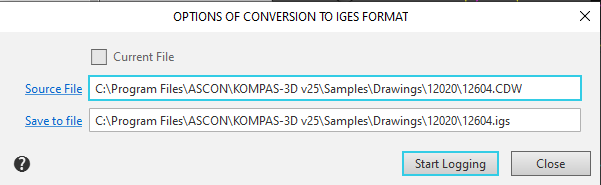
Description of Controls
Element |
Description |
|
Current file |
When this option is enabled, the current document will be saved in IGES format. If there are no open documents, or if the current document is not a graphics file, this option is not available. |
|
Source file |
This field is used to select the file to be exported to IGES format. To select a file, click on the field name, select the file in the window that opens, and click the Open button. The full file name will appear in the field. |
|
Save to file |
By default, the system suggests the name of the document selected for export to the IGES format, with the .igs extension. If you need to select a different file for export, click on the field name, specify the folder, enter a file name, and click the Save button. The full file name will appear in the field. |
|
Start logging |
This button starts the file export. |
|
Close |
To exit the dialog without exporting the file, click this button. |
