|
Setting up a custom hatch style |
Scroll |
To set up the hatch style, use the dialog for creating/editing hatch style. In this dialog box you can create a new custom hatch style or edit an existing one.
Simple hatches (e. g. the hatch of the Metal system style) are created by repeating the same line. To set up a simple hatch, you need to set up the parameters of the source line and its pitch.
Complex hatches (e. g. Non–metal) are created by repeating several lines. To set up a complex hatch, you need to create a list of lines to be repeated in series; you'll need to set up the style and the pitch for each source line. The hatched areas created by repeating each of the lines are imposed one over the other.
To edit the list of the source lines of a hatch, use the Add..., Edit... and Delete buttons. The parameters for each line are configured when this line is created or edited (the Dialog for setting hatch line parameters). For detailed description of this setting, see below.
In addition, you have to set up the filling type (area or strip), scale and slope angle of the hatch.
Setting hatch line properties
The parameters of the source line of a hatch include the line style and position parameters.
The parameters of the position of the source line of a hatch are set relative to the origin of a certain arbitrarily selected rectangular coordinate system. These settings include: the coordinates of the starting point of the source line, the angle of this line, the pitch of this line, and for interrupted lines also the offset of each next line relative the previous line (see the figure).
|
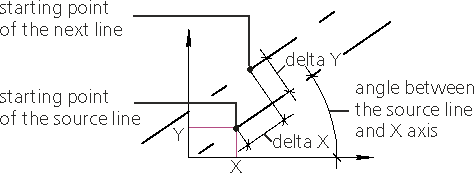
Line properties to plot a hatch
When you create a hatch in a graphic document, this hatch is placed so that the origin of its coordinates system would coincide with the origin of coordinate system of the drawing fragment or view. The angle of rotation of the hatch coordinate system is determined by the value set in the Slope angle field. Dialog for creating/editing hatch style.
|
The appearance of the hatch doesn’t depend on how the construction coordinate system was placed when the hatch style was created. You can select any convenient position of the coordinate system. |

You can select a line style in a list of system or custom styles. The list of system styles is identical for all hatches. The list of custom styles is created separately for each hatch style and is only available when setting up this style.
The style of the source line and the parameters of the source line and subsequent lines location are configured in the Dialog for setting hatch line parameters.
If there are several source lines (e. g. when creating a complex hatch Non–metal), the settings mentioned above apply to each source line. You'll need to select each source line you want to configure in the list in the hatch style create/edit dialog box.
