|
Creating/editing hatch style dialog |
Scroll |
Allows you to create a new or edit an existing custom hatch style. Styles can be stored directly in a document, in a set or a library of styles.


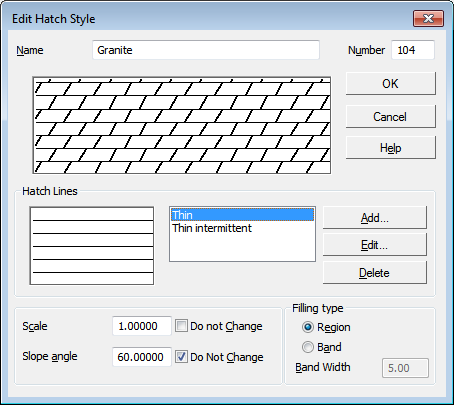
Description of Controls
The element |
Description |
|
Name |
Input/edit field style name. It is recommended to give styles informative names, well reflecting the purpose of styles. In the future, it will simplify the search for a style in the list. |
|
Field of view |
The preview field contains the current appearance of the editable hatch. Changes to the parameters are promptly displayed in this field. |
|
Number |
The field for entering the style number. The number must be unique. If you try to enter a number that is already in use, a warning message will appear on the screen. The rules for style numbering are given in the Style number. |
|
Lines for hatching |
A group of elements for working with shading lines. This group contains: •a list of source lines for shading generation; •field of view of the appearance of the shaded area, which is obtained by repeating the line selected in the list; •Add... button — allows you to add a new line to the list of source lines; invokes Dialog for setting hatch line parametersa new line is always added to the end of the list •Edit... button — allows to change the parameters of the line selected in the list; also calls the dialog for line parameters setup; •Delete button — allows you to exclude a line from the list of source lines. |
|
Scale |
The field to enter the image hatch scale. The coefficient specified in this field multiplies the values X, Y, deltaX, deltaY provided in Dialog for setting hatch line parameters, as well as the lengths of dashes and gaps in broken lines. Line thickness does not change. If you want to be able to change its scale when creating the hatch of this style, disable the option Do not change next to the field Scale. In this case, when forming the hatch in the graphic document, the Step field is displayed in the Parameter Panel (see section Hatching display). |
|
Slope angle |
Hatch angle field. If it is required that when creating a hatch of this style it is possible to change its angle, turn off the option Do not change. In this case, when forming the hatch in the graphic document, the Parameter Panel displays the Angle field (see section). Hatching display). |
|
Filling type |
The group of elements for selecting the hatch design: • Region — allows you to completely fill the area inside the border with hatch, • Band — allows you to insert a figure of a band hatch along the boundary. Upon selecting the option Band, the field Width of the Stripe becomes available, which allows to set the stripe width of the hatching (in millimeters). The range of permissible values is 0.01...5000 mm. |
To finish creating/editing the hatch style, click OK. Click Cancel to discard all styles and close the dialog box.
