|
Construction object |
Scroll |
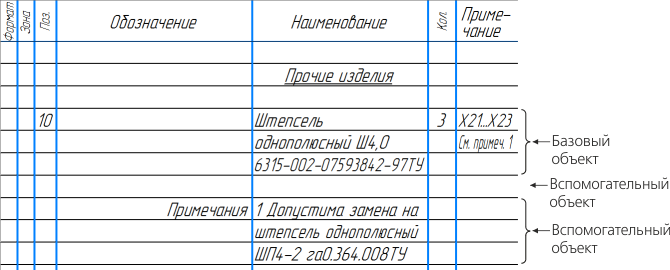
Unlike the base object, for the auxiliary object no service functions are provided, whose running is ensured by the BOM. Auxiliary objects are not automatically sorted, etc.
You can only create auxiliary objects manually. We recommend using them to perform the BOM detailing operations that can not be performed using base items only (see figure). For example, using an auxiliary BOM item, you can enter arbitrary text (comment) in the BOM table or create an empty row in the midpoint of the section. Since the section item sorting rules do not apply to auxiliary objects, the position of the auxiliary item string does not depend on the texts inside this string.
Besides, you can enter any type of data into any column of the auxiliary object (for example, you can enter characters into the column Quantity).
On creating an auxiliary object, see section Adding BOM section and item.
|