|
Notes on mating of the spline by poles with model objects |
Scroll |
Spline By poles Mated with the model objects at its end points.
When a mating is formed, certain geometrical restrictions are created at the spline points adjacent to the mating point. These restrictions are automatically applied to the spline points after you select the mating condition. Depending on the selected condition, the restrictions may apply to one spline point (adjacent to the terminal point) or to two points: the adjacent point and the next one. If required, these points are displaced so that the mating condition was satisfied.
Points with applied constraints are marked with a special icon in Point parameters table.
Spline coupling at the extreme point is possible if it has a sufficient number of neighboring points for the given coupling that are not used for spline coupling at the opposite extreme point. One free point is required for mating By tangent or Perpendicular; two free points are required for Smooth mating.
|
For a Smooth mating, the spline degree should be greater or equal than 4. |

On the following figures you can see the source spline and the matings of the spline with the model objects under various conditions. The starting point of a spline (point 1) is its mating point. The shape of the spline and the position of adjacent points (2 and 3) will change.
|
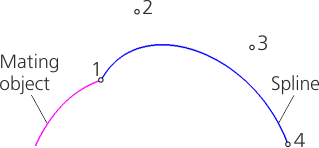
Initial state of the spline (before mating)
Moving spline points when creating matings under various conditions
By tangent |
Perpendicular |
Smooth |
|
|
|
|
|
Point 2 moves along the line a, passing through point 1 relative to the conjugate object. |
Point 2 moves along a line b, passing through point 1 perpendicular to the mating object. |
Point 2 moves along the straight line a, passing through point 1 tangent to the conjugation object. Point 3 moves to the straight line c, parallel to a. The distance from a to c depends on the curvature of the conjugation object at the conjugation point and the distance between points 1 and 2. |
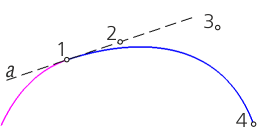
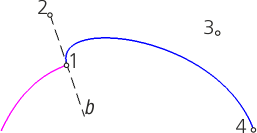
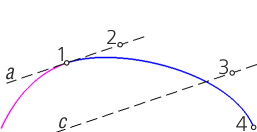
After the mating is created, the spline points adjacent to the mating point, become restricted in displacement: you can only move these points along the corresponding straight lines (see the table above). For example, if you create a mating by tangent, the point adjacent to the terminal point may only move along the tangent line of the mating object (this line passes through the mating point).
If the points adjacent to the mating point are linked with point objects or were plotted by Axes or By Objects, then the creation of the mating is possible only by modifying the plotting parameters of these points (by removing the link to the point object, changing the plotting method to By Coordinates). In this case, when you select the mating object, a message will appear saying that the point plotting and movement method are changed.
To continue creating the mating, press Edit. The point plotting parameters and (if needed) its coordinates will be changed. A mating will be created.
To cancel mating, press the Cancel button. Selection of the mating object will be canceled.
