|
Notes on configuring parameters of the view caption of in the mirrored version |
Scroll |
During creation of an associative drawing of the model containing the mirrored version, you can add an associative view of this version into the drawing. At the same time, captions of views of mirrored versions and the version which is the original for it are created in the drawing automatically.
|
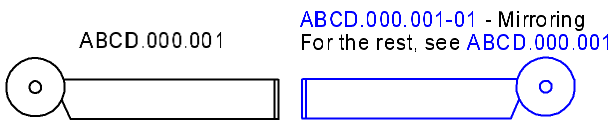
Associative views of the initial and mirrored design versions of a model
Conditions for creation of captions:
•the drawing contains associative views of the initial and mirrored versions (captions are created when adding one of these views if another one is already available in the drawing),
•the drawing does not contain associative views of other models and other versions of the same model,
•while setting up the parameters of a drawing view, on the Caption tab of the dialog View, the Create captions when inserting an associative view of a mirrored design option is enabled.
|
If the associative view of one of the versions (original and mirrored) already contains the view caption, then after adding an associative view of a different version, the existing caption will be complemented. |

The caption of an associative view of mirrored version is generated as per a template. This template is defined by setup and if necessary can be changed (see section Caption tab).
The caption of an associative view of initial version is not configurable. It contains a reference to the designation of the model version — the source of view. The document code which is part of the designation is not included into the reference.
Both captions may contain other elements, for example, the 'Rotated' signage, a view scale, a rotation angle, etc. This depends on settings of caption parameters.
Further on, you’ll be able to edit or delete the view caption created automatically as a regular view caption.
While deleting a caption of one of the views together with the caption, the caption of the second view is not deleted.
|
Note that the above described view captions can be added into a drawing only automatically. You can’t create them manually. If the caption on one of the views was edited or deleted, then to restore the caption it is necessary to re-create the view. |

