|
Methods of building the first segment |
Scroll |
The following methods are available for constructing the first segment in the chain of objects created by the Autoline command:
•parallel or perpendicular to object,
•tangent to one object and parallel to another,
To build the first segment, located arbitrarily, set its starting and ending points or the starting point, length and slope angle of the segment.
Parallel or perpendicular to object
To build the first segment of the chain parallel or perpendicular to the object, follow these steps.
1.Specify the starting point of the segment. A phantom of the segment being created appears in the graphics area.
2.Specify a straight-line object to which the segment being created should be perpendicular/parallel. The name of the specified object is displayed in the Object field. Phantom segment will change its position. When the cursor moves along the selected object, the phantom is parallel to it, and when moving to or from the object, it is perpendicular.
|
You can first specify the object, and then the starting point of the created segment. |

3.By moving the cursor, select the desired segment direction and select its end point.
|
|
a) |
b) |

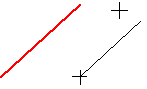
Construction of the first autoline segment
a) perpendicular to object, b) parallel to the object
To build the first segment of the chain tangential to the object, follow these steps.
1.Specify the starting point of the segment. A phantom of the segment being created appears in the graphics area.
2.Specify the curve, that the segment should be tangential to. Its name is displayed in the Object field. Phantom segment will change its position. It will be located tangential to the curve. If it is possible to construct several tangents to this curve, the system automatically selects the option closest to the point where the curve is indicated.
|
If you need to manually select the desired phantom position, start the construction by specifying the curve. A phantom of the segment being created appears in the graphics area. Move the cursor to achieve the desired phantom position. After that, specify the starting point of the segment. |
3.Set the end point of a segment.
|
To make a segment start/end exactly at the tangency point, use the snapTangency. |

|
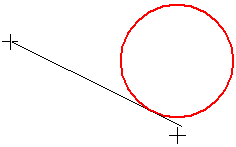
Construction of the first segment of the chain tangential to the circle
To build the first segment of the chain tangential to two objects, follow these steps.
1.Specify two curves that the created segment must be tangential to. Their names will be displayed in the field Object. A phantom of the segment will appear in the graphics area. It will touch the selected objects at the points closest to the indicated points of these objects.
2.Specify the starting and ending points of the segment.
|
To make a segment start / end exactly at the touch points, use the snapTangency. |
|
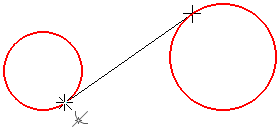
Construction of the first segment of the chain tangential to the two circles
Tangent to one object and parallel to another
To build the first segment of the chain tangential to one object and parallel to another, follow these steps.
1.Specify the following objects in any sequence: the curve to which the created segment should touch, and the straight-line object to which it should be parallel. The selected object names will be displayed in the Object field. A phantom of the segment will appear in the graphics area. If several variants of phantom location are possible, the system automatically selects the option closest to the indication point of the second object.
2.Specify the starting and ending points of the segment.
|
To make a segment start/end exactly at the tangency point, use the snapTangency. |
|
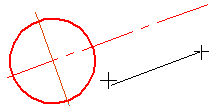
Construction of the first segment of the chain tangential to the circle and parallel to the axis
To build the first segment of the chain lying on the bisector of the angle formed by two straight line objects, follow these steps.
1.Specify two non-parallel straight objects. Their name will be displayed in the Object field.
2.Specify the starting point of the segment. A phantom of the segment appears on the graphic area, lying on the bisector of the selected angle.
3.Set the end point of a segment.
|
If the specified straight line objects are parallel to each other, then the resulting segment will lie on a straight line passing in the middle between them. |
|
|
a) |
b) |
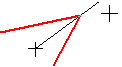
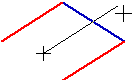
Construction of the first segment of the chain
a) on the bisector, c) midway between two parallel segments
