|
Methods of building subsequent segments |
Scroll |
The following methods are available for constructing subsequent segments:
•freely,
•parallel or perpendicular to object,
To build the first subsequent segment, located arbitrarily, set ending point or, length and slope angle of the segment.
Parallel or perpendicular to object
To build a subsequent segment of the chain parallel or perpendicular to the object, follow these steps.
1.Specify a straight-line object to which the segment being created should be perpendicular or parallel to. Its name will be shown in the field Object. A phantom of the segment being created appears in the graphics area. When the cursor moves along the selected object, the phantom is parallel to it, and when moving to or from the object, it is perpendicular.
2.By moving the cursor, select the desired segment direction and select its end point.
|
|
a) |
b) |

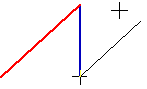
Construction of the next segment of the chain
a) perpendicular to object, b) parallel to the object
To build the subsequent segment of the chain tangential to the object, follow these steps.
1.Specify the curve, that the created segment should be tangential to. Its name will be shown in the field Object. A phantom of the segment will appear in the graphics area. It will touch the curve at the point closest to its indication point.
2.Set the end point of a segment.
|
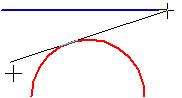
Construction of the next segment of the chain tangential to the arc
|
To finish a segment at the exact tangency point, use the snap Tangency. |

