|
Methods of building first arc |
Scroll |
The following methods are available for constructing the first arc in the chain of objects created by the Autoline command:
To build the first arc in an arbitrary manner, follow these steps.
1.Specify the starting and ending points of the arc. A phantom of the arc will appear in the graphics area.
2.Specify the point through which the arc should pass, or specify its radius/diameter by pressing the Radius  or Diameter
  button in the group Arc Parameter and entering the value in the corresponding field.
To build the first arc of the chain tangential to the object, follow these steps.
1.Set the start point of an arc. A phantom of the created arc appears in the graphics area.
2.Specify the object that the arc should touch. Its name will be shown in the field Object. The phantom of the arc will become tangential to the selected object.
3.Set the end point of an arc. The radius/diameter of the arc will be determined automatically.
You can set the radius/diameter manually before specifying the end point of the arc. To do this, click the Radius button or the Diameter button in the Arc Parameter group and set the value in the respective field.
|
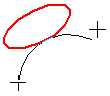
Construction of the first arc of the chain tangential to the ellipse
|
If necessary, you can first specify the starting and ending points of the arc, and then the object that it should touch. The radius/diameter of the arc will be determined automatically. |

To build the first arc of the chain tangential to two object, follow these steps.
1.Set the start point of an arc. A phantom of the created arc appears in the graphics area.
2.Specify the objects which the arc should touch. Their names will appear in the Object field and the phantom will be located tangentially to these objects. These objects determine the radius/diameter of the arc. It cannot be changed.
3.Set the end point of an arc.
|
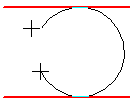
Construction of the first arc of the chain tangential to the two objects
